
Applies to: Everyone who uses UtilizeCore | Web and Mobile
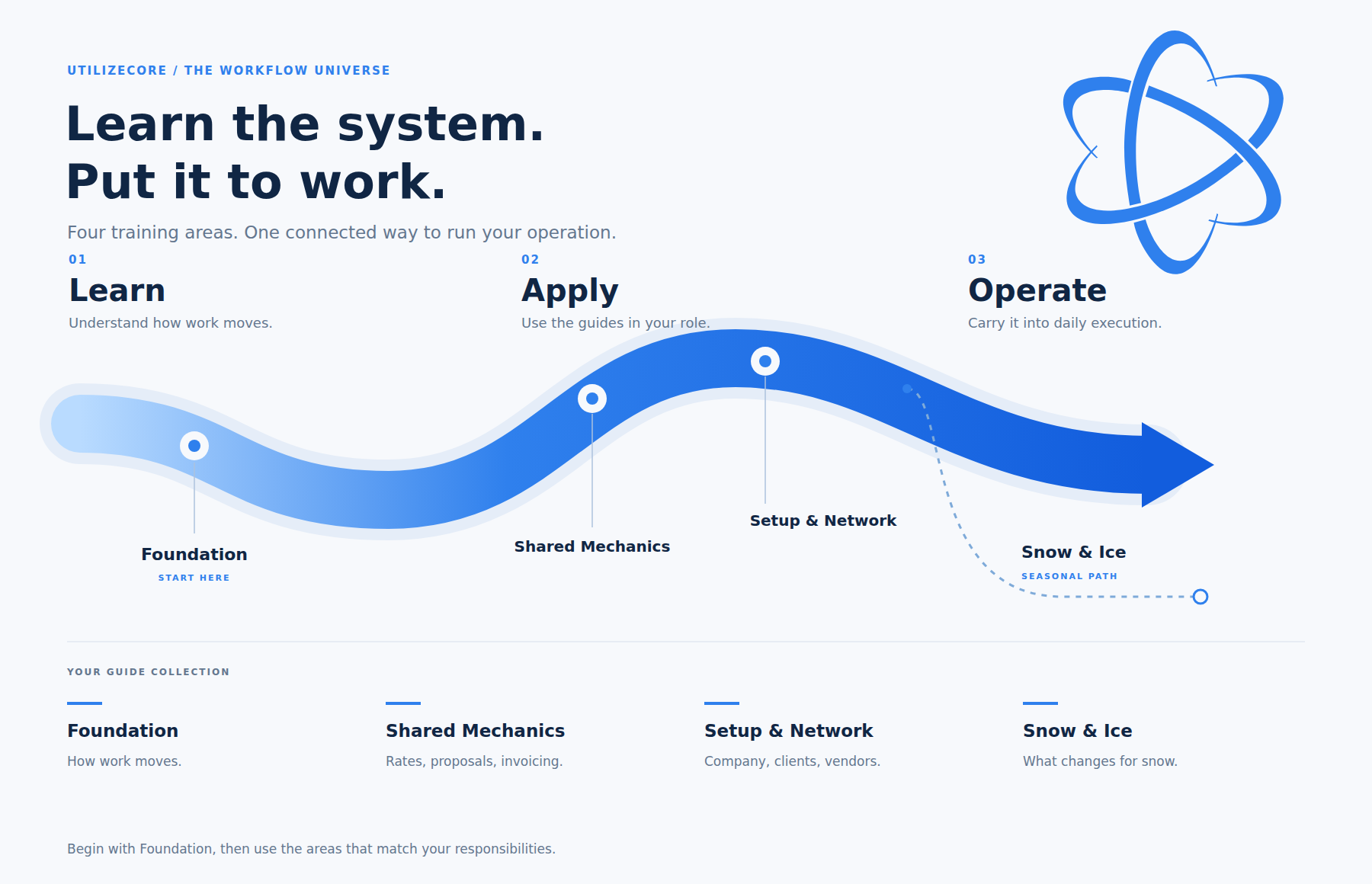
How the map works.
The guides follow one path: learn how work moves, apply it in your role, then carry it into daily operation. Foundation is where everyone starts: how a Work Order moves, Action Filters, Trip status, and billing methods. Shared Mechanics covers rates, proposals, and invoicing, which every kind of work uses. Setup & Network covers your company, your Clients, and your Vendors. Snow & Ice is a seasonal path: it covers only what changes for snow and points back to the guides that explain everything else.
Everything links in. Every guide opens with a Where this fits strip: its layer, who it is for, what to read first, and what to read next. "Read first" always points to a guide closer to Foundation, so you never need a later guide to understand an earlier one.
Start Here
New to UtilizeCore, or starting an implementation? Begin with one of these.
| Your First Week on UtilizeCore | For the Vendor's office: six things to do once, three every week. |
| Keys to Success: Your Operations Lead | The one role every implementation needs, and what it owns each week. |
Layer 1 · Foundation
The core. Read these before anything else in your role.
| How a Work Order Moves | The seven phases every Work Order passes through, and who owns each one. |
| Your Work Order Lifecycle Map | One page: the phases, who owns them, and the Action Filters that watch them. |
| From Intake to the Field | From a Service Request to a Trip on a technician's phone. |
| Action Filters | How work sorts itself into the Action Filters you work from every day. |
| Action Filters in One Page | Every Action Filter on one sheet, for the desk. |
| Trip Status and Pin Legend | Every Trip status, the pin it shows, and what to do about it. |
| Billing Methods Explained | What each billing method charges, and the faults behind most billing errors. |
Layer 2 · Shared Mechanics
Rates, pricing, and invoicing. Every kind of work uses these.
| Rate Hierarchy | Which rate the platform pulls when more than one could apply. |
| Rate and Item Structure | How services, items, and rate types fit together. |
| Pricing Setup | Loading rates so every Work Order prices itself. |
| From Vendor Quote to Billed Proposal | A Vendor quote, marked up, approved by the Client, and billed. |
| Invoicing: From Verified Trip to Paid | From a verified Trip to a paid Invoice, step by step. |
| Bulk Invoicing | Generate, review, and send invoices in batches. |
| Bulk Invoicing Quick Reference | The bulk invoicing run on one page. |
| Biller Day | The five moves a biller makes on a line, and what a $0 means. |
Layer 3 · Setup & Network
Your company, your Clients, and the people doing the work.
| Setting Up Your Company | Company Settings, segment by segment, in the order to decide them. |
| Onboarding a New Client | From a signed Client to the first Work Order. |
| Client Portal Rollout | Put your Clients on the portal, with an owner for keeping it clean. |
| Running your Vendor Network | Invite, qualify, rate, and keep Vendors active. |
| Managing an Integrated Client | Clients on ServiceChannel, Corrigo, or another CMMS: setup and upkeep. |
| Integrated Client Day | The daily checks for a Client whose Work Orders arrive from their CMMS. |
| The Field Guide | For the technician on mobile build 3.0: find the Trip, do it, close it. |
Layer 4 · Snow & Ice
What changes when the work is snow. Read Layers 1 and 2 first.
| Snow Season Setup | Contracts, rates, and Sites ready before the first storm. |
| Snow: October to March | Running the season, storm by storm, through to the Invoice. |
| Storm Day | Before, during, and after one storm, on one page. |
Find it by role.
| Your role | Start with | Then |
|---|---|---|
| Dispatcher | How a Work Order Moves | From Intake to the Field · Action Filters · Trip Status and Pin Legend |
| Biller | Billing Methods Explained | Invoicing: From Verified Trip to Paid · Bulk Invoicing · Biller Day |
| Admin | Setting Up Your Company | Pricing Setup · Onboarding a New Client · Running your Vendor Network |
| Operations Lead | Keys to Success: Your Operations Lead | Your Work Order Lifecycle Map · Action Filters · Managing an Integrated Client |
| Field (Vendor office and technicians) | Your First Week on UtilizeCore | The Field Guide · Trip Status and Pin Legend |
| Running snow (any role) | Snow Season Setup | Snow: October to March · Storm Day |
Finding a guide fast.
Every guide is tagged with the roles it serves: Dispatcher, Biller, Admin, Operations Lead, and Field. Search the knowledge base for your role to see every guide written for you. Each guide also has a printable PDF linked at the top.
Questions? Contact your Customer Success team or email support@utilizecore.com.