
| Where this fits: Workflow Universe › Layer 2 · Shared Mechanics | For: Dispatcher, Biller | |
| Read first: How a Work Order Moves · Rate Hierarchy | Read next: Invoicing: From Verified Trip to Paid |
Applies to: Estimators, account managers, approvers | Web
Download the printable guide (PDF)
Before anything else. A Proposal is a quote that becomes the invoice. Type it once: the Vendor’s quote first, forwarded to the Client with your margin on it. Forward to Client sends nothing. Evaluate is the send. Reject and Duplicate is how you change your mind.
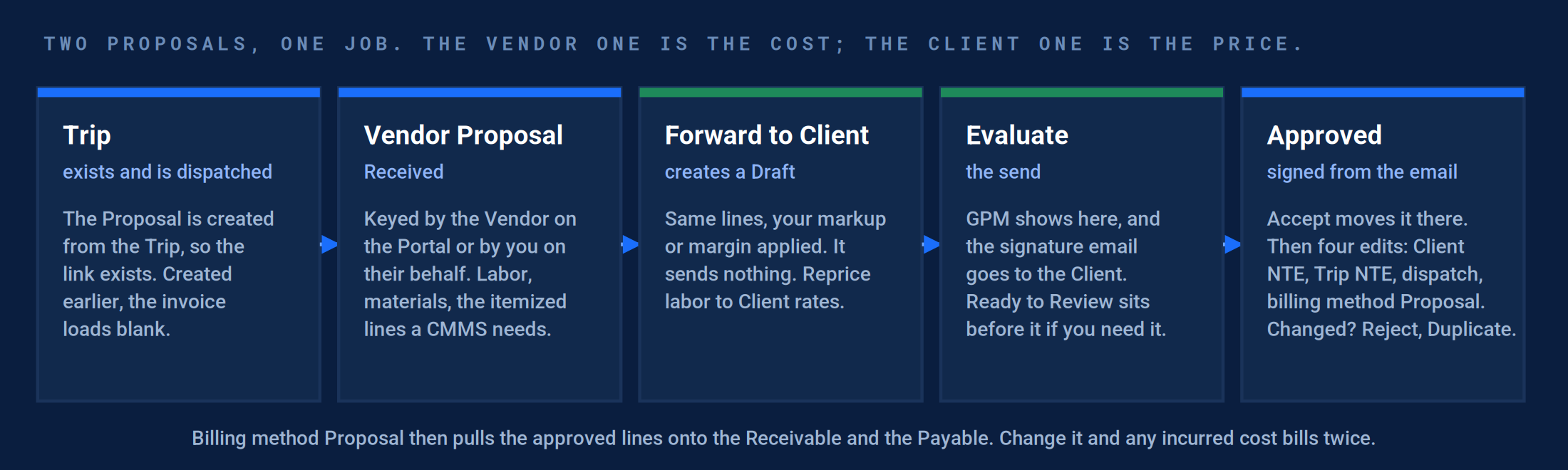
Five moves. The Trip first, the Vendor Proposal, Forward to Client, Evaluate, then Approved. The quote is typed once.
The setup gate.
Part A · For whoever owns items and rates
Blank and $0 lines are the top proposal failure, and none of them are proposal problems. They are item and rate problems, seen first on the quote.
1. Items are simple, unique, and mirror accounting.
Where: Products and Services › Items. One name per category; never the same name under Service and under Labor.
Exception: Repair existed under both Service and Labor. The estimator picked the one with no rate and every labor line came out at $0.
Correction: The item list reads like the chart of accounts, and no name appears twice.
2. Site generic Client rates exist for every Service you quote.
Where: Rates & Assignees › Per Hour and Per Service, Rate Level Site Default or Generic, Client side. See Pricing Setup, step 2.
Exception: Labor rates were loaded only for one named Vendor at the Site. When that Vendor was not on the Trip, the line was $0.
Correction: A test Proposal on a Site with no named Vendor returns a labor rate.
3. The markup or margin default is the one the contracts use.
Where: Company Settings › Workflow › Proposals › Proposal Creation.
Exception: An estimator applied 15% margin to a contract that said 15% markup on parts. Every quote was high by the difference until the Client caught it.
Correction: The setting reads Markup or Margin as the contract says, and the worked example below matches a real quote.
| Markup | Margin | |
|---|---|---|
| The formula | Price = Cost × (1 + rate) | Price = Cost ÷ (1 − rate) |
| 15% on a $1,000 Vendor line | $1,150 | $1,176.47 |
| What the contract says | “Cost plus 15%”, “15% on parts” | “15% gross margin”, “GPM of 15” |
| Where it is set | Company Settings › Workflow › Proposals › Proposal Creation. |
4. The two permissions are on.
Where: The Trip: Enable proposal creation for vendor. The role: the Invoices permission for anyone who adds Proposal lines.
Exception: “Enable proposal creation for vendor” governs your ability to create a Proposal on the Vendor’s behalf. Off, the coordinator cannot key the quote.
Correction: The coordinator role can create a Vendor Proposal on a Trip and add lines to it.
5. Materials carry the right tax flag.
Where: The item catalog, per item.
Exception: Every material was flagged taxable on an account that passes tax through as one line.
Correction: A test Proposal shows tax where the contract puts it.
Result: A test Vendor Proposal on your test Site carries a Trip number, every line has a rate, the forward applies the contract’s markup, and the tax lands where it should.
Run it, end to end.
Part B · For the estimator and the approver
From the trigger to the approved Proposal on the Work Order, then what happens when the Client changes the answer.
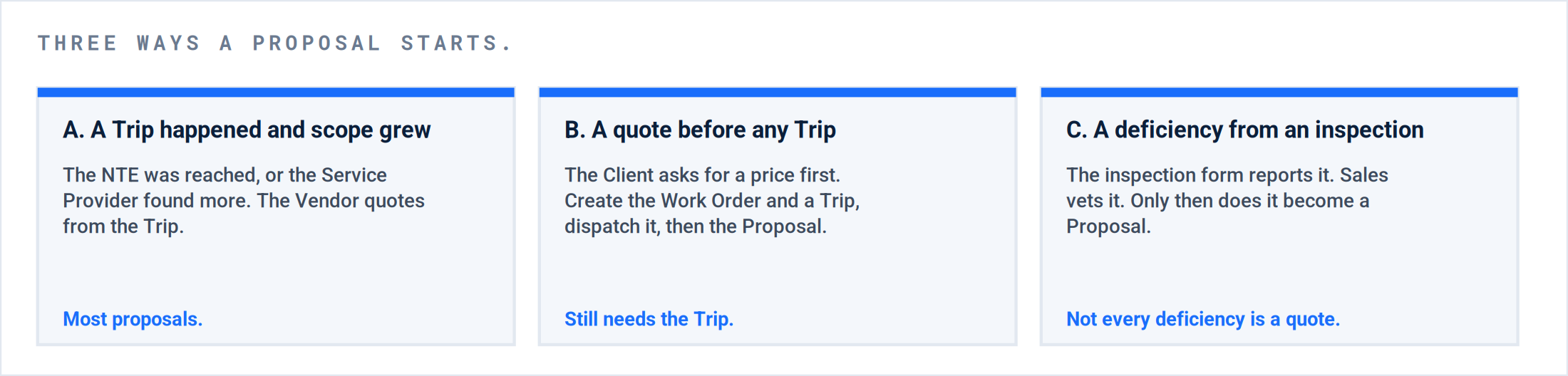
Where it starts. All three end at the same place: a dispatched Trip with a Vendor Proposal on it.
P3 · Assignment and Dispatch. The Vendor Proposal comes in.
The Vendor keys the quote on the Vendor Portal or the mobile app, or you key it for them from the PDF. Either way it is created from a dispatched Trip and lands at Received, in the Review Vendor Proposals Action Filter.
| Do this | Where | Pass when |
|---|---|---|
| Dispatch the Trip first | The Work Order › the Trip › Save & Dispatch | The Trip shows a Vendor and a dispatched status before any Proposal exists. |
| Create the Vendor Proposal from the Trip | The Trip › Proposals › + Vendor Proposal, or the Vendor does it on the Portal | The Proposal header shows the Trip number. |
| Itemize it | Labor with hours and rate, Materials, an item on each line | Every line has an item and a non-zero amount. |
| Approve the Vendor’s price | Review Vendor Proposals Action Filter › Save & Approve | No blank line. Status Approved on the Vendor side. |
[Screen: The + Vendor Proposal dialog from a dispatched Trip, showing the Trip selector.]
Result: A Vendor Proposal tied to a dispatched Trip, itemized, with a rate on every line, approved on your side.
P3 · Assignment and Dispatch. Forward to Client, then read the margin.
Do not build the Client Proposal. Forward the Vendor one. The three-dot menu on the Vendor Proposal carries Forward to Client; it asks for the markup or margin and creates a Draft Client Proposal with the same lines. It sends nothing.
| Do this | Where | Pass when |
|---|---|---|
| Forward | Vendor Proposal › three-dot menu › Forward to Client › the rate › Proceed | A Draft Client Proposal exists with the same line count. Nothing was sent. |
| Reprice labor | The Draft Client Proposal › the labor lines | Labor carries the Client’s Per Hour rate, not cost plus markup. |
| Read the GPM | The Client Proposal, once it reaches Evaluate | Above the contract’s floor. Below it, a wrong rate or a wrong item, not a bad quote. |
[Screen: Forward to Client on a Vendor Proposal, and the Client Proposal at Evaluate with GPM showing.]
Result: A Draft Client Proposal with the Vendor’s lines, labor repriced, ready for the ladder.
P5 · Validation and Resolution. The ladder: from Draft to Approved.
The one thing to know. On the Client Proposal, Evaluate is the send. It emails the Client a signature page; when they accept, the status becomes Approved on its own. Ready to Review is your internal step before it. Neither exists on the Vendor Proposal.
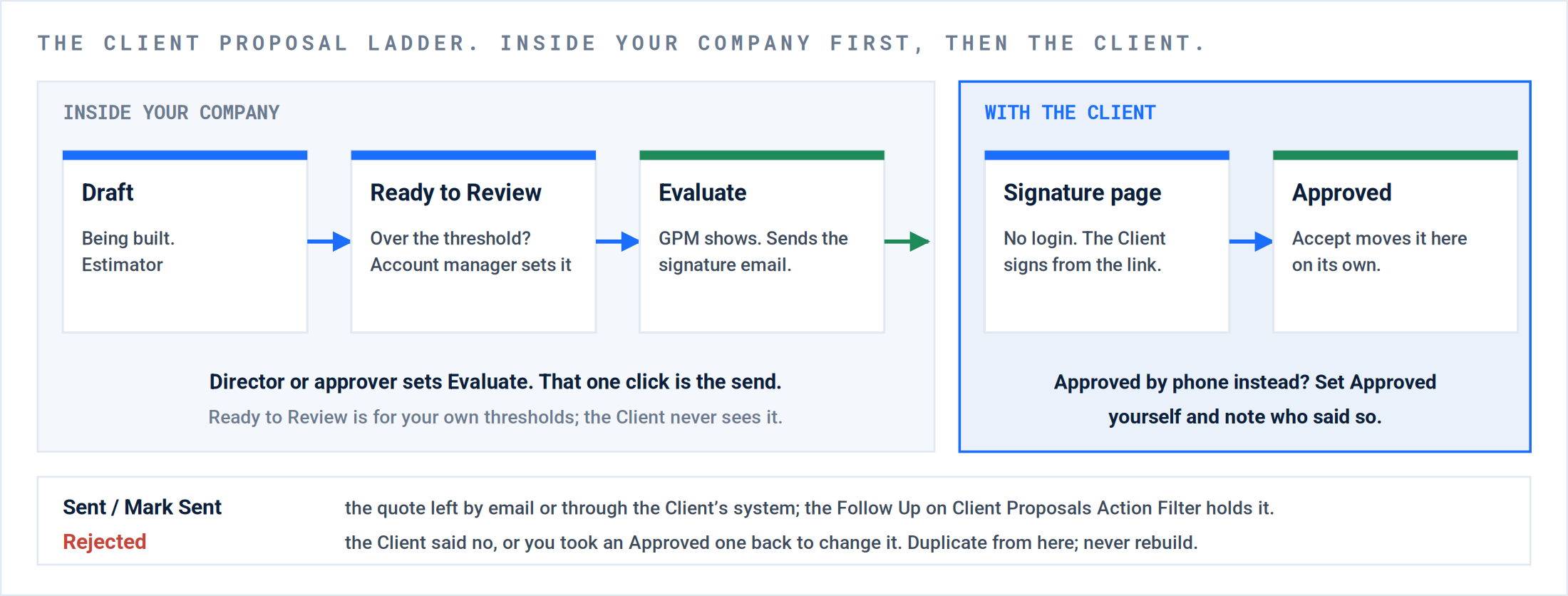
Inside your company first, then the Client. The account manager sets Ready to Review, the approver sets Evaluate, the Client signs from the email without logging in. Approve by hand only when the yes came by phone.
| Do this | Who | Pass when |
|---|---|---|
| Ready to Review | The account manager, when the quote is over the threshold your company set | Status Ready to Review. Still internal; the Client sees nothing. |
| Evaluate | The director or whoever approves quotes | The GPM shows, and the signature email has gone to the Client. The prompt to send it is on by default. |
| The Client signs | The Client, from the link in the email. No portal login, no user account needed. | Status Approved, with the signature on the record. |
| Approved by phone or in their system instead | You | Set Approved yourself and note who said so. Proposals do not cross a CMMS integration; a CMMS Client approves in their system and you set Approved here. |
| It went out by email or through their system | You | Mark Sent. The Follow Up on Client Proposals Action Filter holds it until an answer arrives. |
Under the threshold. A small quote does not need the ladder. Evaluate straight from Draft; the email still goes out and the GPM still shows. Ready to Review exists so that a director sees the big ones before the Client does.
Result: The Client Proposal at Approved, signed from the email or set by you with a name on it.
P5 · Validation and Resolution. Put the approval on the Work Order.
| Do this | Where | Pass when |
|---|---|---|
| Client NTE to the approved total | The Work Order header | NTE equals the Client Proposal total. |
| Vendor Trip NTE to the Vendor Proposal total | The Trip › the Vendor assignment › NTE | The Trip detail document the Vendor receives now shows the approved amount. That is the sign-off sheet. |
| Billing method Proposal, both sides | The Trip | Set before the repair Trip runs. Switching after incurred cost exists bills that cost twice. |
| Dispatch the repair Trip | The Work Order › + Trip › Save & Dispatch | The Vendor’s approval email carries the Trip with its NTE. |
Result: Four edits done. The Vendor rolls with the approved amount on the sheet, and the invoice will read the approved lines.
P5 · Validation and Resolution. Change it after the fact: Reject, Duplicate, again.
When the answer changes. Reject the one on file, Duplicate it, change what changed, and run the ladder again. The original stays as the record. Same three clicks on a Vendor Proposal. The duplicate can go to a different Site or Client if the first one was filed wrong.
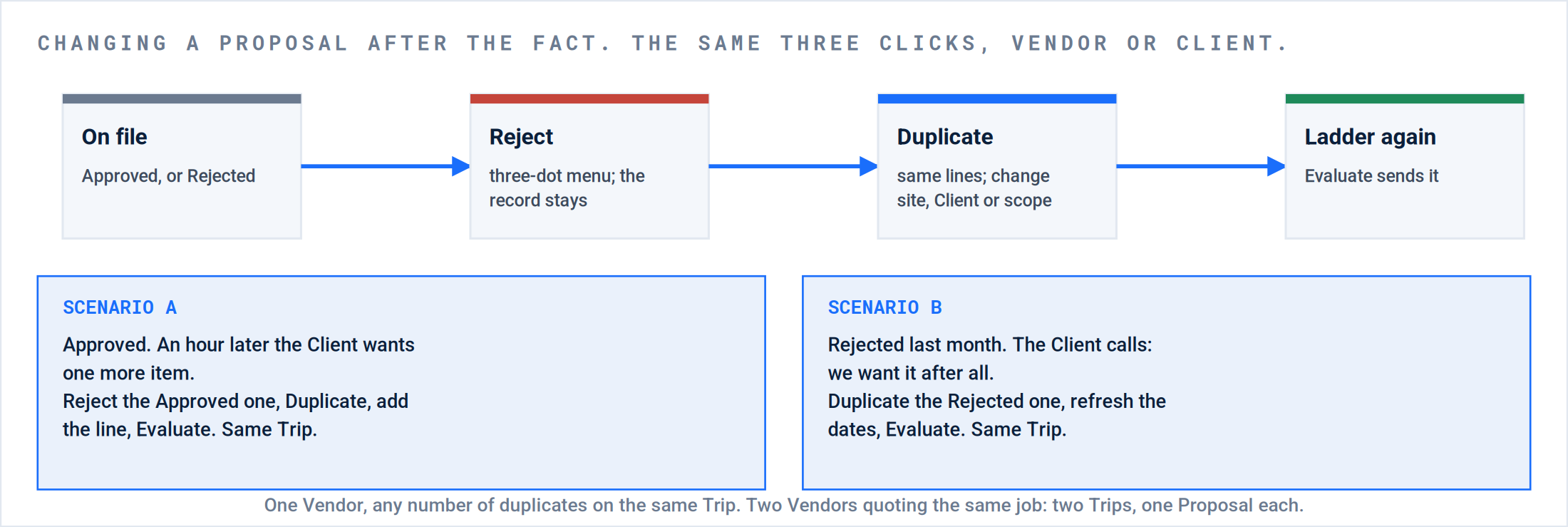
Two scenarios, one flow. An Approved quote that needs one more line, and a Rejected quote the Client wants after all.
| Situation | Do this | Not this |
|---|---|---|
| Approved, then the Client wants a change | Reject the Approved one. Duplicate. Edit the copy. Evaluate. | Edit the Approved one; it is locked. Rebuild it line by line. |
| Rejected, then the Client says yes after all | Duplicate the Rejected one. Refresh dates. Evaluate. | Delete the Rejected one. It is the record of what was quoted. |
| The Vendor’s price changed | Reject and Duplicate the Vendor Proposal, then Forward to Client again with the same rate. | Edit the Client Proposal alone; the GPM is now wrong. |
| Filed on the wrong Site or Client | Duplicate, and pick the right Site or Client in the dialog. | Start over. |
| A second Vendor quoting the same job | A second Trip for the second Vendor; one Vendor Proposal on each. | Two Vendors’ Proposals on one Trip. One Vendor can duplicate on the same Trip as often as needed. |
Result: One live Proposal per side, the old ones Rejected on the record, the Trip count equal to the Vendor count.
P5 · Validation and Resolution. Who gets emailed, and how to change it.
| Goes to | To stop it | |
|---|---|---|
| Signature request, on Evaluate | The Client contacts on the Proposal | Answer No to the send prompt on Evaluate. The status still moves. |
| Approved and Rejected notices | The Business Email on the Client record, plus the Site contacts flagged to receive them | Per Client: clear the Business Email on the Client record and take the flag off the Site contacts. There is no single company-wide switch; ask your Customer Success team if you need one. |
| Vendor approval | The Vendor on the Trip | You want this one. Set the Trip NTE first so the sheet it carries shows the approved amount. |
The Client already said yes by phone. Set Approved yourself and the approval notice still goes to the Business Email. If a Client complains about it, the Client record is where it is turned off, not the Proposal.
Then bill it.
| Do this | Where | Pass when |
|---|---|---|
| Verify the Trip | Verify Trips Action Filter | Trip Verified. |
| Generate Invoices | Generate Invoices Action Filter | The Receivable and the Payable carry the approved lines exactly. A blank invoice means the Proposal has no Trip: edit it and pick the Trip. |
| Check the pennies | The synced invoice in your accounting system | Line totals match. A one-cent difference is rounding between the two systems, not a wrong line; see Invoicing: from verified Trip to paid. |
Result: The invoice matches the quote, and Profitability on the Work Order reads the margin you saw at Evaluate.
Where this usually goes wrong.
| # | What you see | What happened | The fix |
|---|---|---|---|
| 1 | The invoice loads blank on an approved Proposal. | The Proposal was created before the Trip was dispatched and carries no Trip. | Edit the Client Proposal, select the Trip. Dispatch first, always. |
| 2 | Labor lines at $0. | Rates only at Site Assignee or PM level, or a duplicate item name with no rate. | Site generic Client rates; one item name per bucket. Part A. |
| 3 | The Client Proposal took as long as the Vendor one. | It was typed, not forwarded. | Forward to Client, then reprice labor. |
| 4 | Quotes high or low by a few percent. | Margin applied where the contract says markup, or the reverse. | The Proposal Creation setting and the worked example in Part A. |
| 5 | No margin anywhere. | The Client Proposal never reached Evaluate. | Evaluate. It is the send and the margin in one click. |
| 6 | The Client never got a signature email. | Saved at Draft or Ready to Review; or No was answered on the send prompt. | Evaluate, and answer Yes. |
| 7 | Approved, and the Trip blocked at the NTE. | The Client NTE and Vendor Trip NTE were not updated after approval. | The four edits, every approval. |
| 8 | The Vendor’s sheet shows the old NTE. | The Trip NTE was left at the dispatch value. | Set the Trip NTE to the approved Vendor total before the repair Trip goes out. |
| 9 | Costs doubled on the Payable. | The billing method was switched to Proposal after incurred cost was on the Work Order. | Set it before the repair Trip; never switch after. |
| 10 | “I cannot edit an approved Proposal.” | Approved is locked by design. | Reject, Duplicate, edit the copy, Evaluate. |
| 11 | The Client complains about an approval email they did not need. | The Business Email on the Client record receives every approval and rejection notice. | Clear it, or take the flag off the Site contacts, per Client. |
| 12 | Cannot add a second Vendor’s Proposal. | One Trip already carries a Vendor Proposal. | A second Trip for the second Vendor. |
| 13 | Invoice a penny off from the quote in the accounting system. | Rounding differs between the platform and the accounting system on some lines. | Not a wrong line. Reconcile at the total; see Invoicing. |
| 14 | Tax on every material line. | The item catalog flag, not the Proposal. | Fix the items. |
What good looks like.
| Checkpoint | Evidence |
|---|---|
| Every Vendor Proposal carries a Trip number | The header shows it; the invoice will not load blank. |
| Every Client Proposal was forwarded | Same line count as its Vendor Proposal; the activity log shows Forward to Client. |
| Every quote over the threshold shows Ready to Review, then Evaluate, by two different people | The activity log names the account manager and the approver. |
| Approvals carry a signature or a name | Signed from the email, or Approved by hand with a note saying who said yes. |
| Approval reached the Work Order | Client NTE equals the approved total, Trip NTE equals the Vendor total, billing method is Proposal, and the repair Trip is dispatched. |
| Changes were duplicated, not rebuilt | Every revised quote has a Rejected original behind it. |
| The invoice matches the quote | Receivable and Payable lines equal the two Proposals. |
Questions? Contact your Customer Success team or email support@utilizecore.com.