
| Where this fits: Workflow Universe › Layer 1 · Foundation | For: Operations Lead, Admin | |
| Read first: How a Work Order Moves | Read next: Action Filters |
Applies to: Department heads, operations leads, Customer Success Managers | Web
Download the printable guide (PDF)
Worksheet · Department heads and operations leads
Seven phases, the same for every company. Your three columns: who owns each phase, the status that hands it to the next team, and what has to be true first. No blank cell, no lost Work Order.
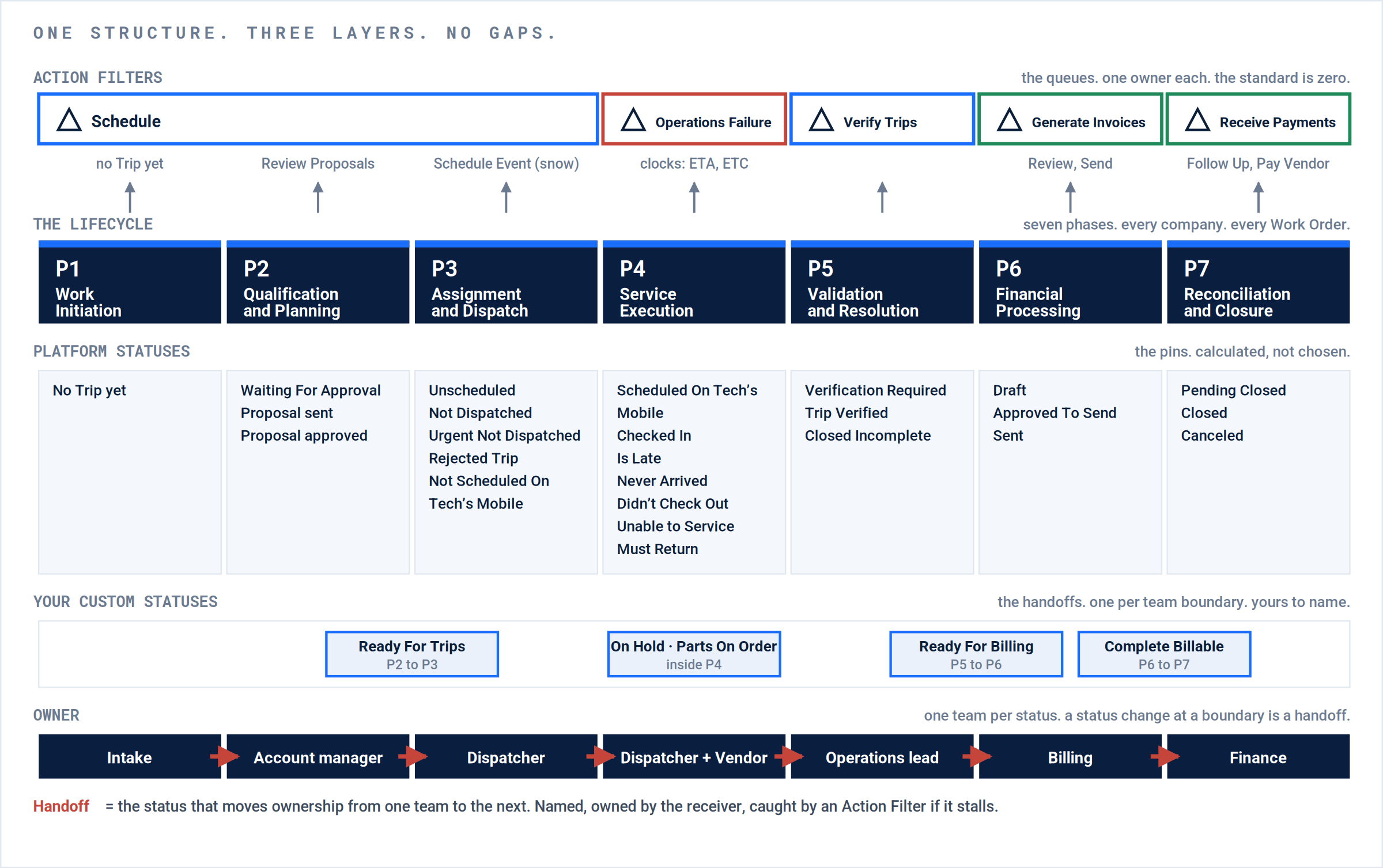
The structure. Action Filters above, phases in the middle, statuses and owners below. Custom statuses live only on the boundaries where ownership changes and no Action Filter marks the moment.
The map.
| Phase | Platform statuses | Caught by | Owning team | Handoff status out | True before it moves |
|---|---|---|---|---|---|
| P1 Work Initiation |
No Trip yet (Unscheduled) | Schedule | |||
| P2 Qualification and Planning |
Waiting For Approval, Proposal sent, Proposal approved | Review Proposals · Waiting For Approval has no Action Filter | |||
| P3 Assignment and Dispatch |
Unscheduled, Not Dispatched, Urgent Not Dispatched, Rejected Trip, Not Scheduled On Tech’s Mobile | Schedule (the first four) · Operations Failure (Not Scheduled On Tech’s Mobile) · Schedule Event | |||
| P4 Service Execution |
Scheduled On Tech’s Mobile, Checked In, Is Late, Never Arrived, Didn’t Check Out, Unable to Service, Must Return | Operations Failure, with the ETA and ETC clocks · Must Return has no Action Filter | |||
| P5 Validation and Resolution |
Verification Required, Trip Verified, Closed Incomplete | Verify Trips | |||
| P6 Financial Processing |
Draft, Approved To Send, Sent | Generate Invoices · Review Client Invoices · Review Vendor Invoice · Send Client Invoice | |||
| P7 Reconciliation and Closure |
Pending Closed, Closed, Canceled | Receive Payments · Follow Up on Client Invoices · Pay Vendor |
Pass before go-live.
| # | Check | Proof | Done |
|---|---|---|---|
| 1 | Every phase has an owning team; none blank, none “everyone”. | Seven owner cells filled. | |
| 2 | Every status has one owner; a custom status belongs to the team that receives it. | Custom Statuses list matches the map. | |
| 3 | Every status is caught: an Action Filter, a clock, or a saved filter someone opens every morning. | Waiting For Approval and Must Return have a named reader. | |
| 4 | Every owner change has one handoff: a custom status or an Action Filter, never neither. | Six red arrows, six handoffs. | |
| 5 | No status duplicates an Action Filter or another status. | None at zero Work Orders in 90 days. | |
| 6 | Every custom status has an action mapping you chose. | Every Cancel is one you meant. |
Questions? Contact your Customer Success team or email support@utilizecore.com.