
| Where this fits: Workflow Universe | For: Everyone | |
| Read first: The Workflow Universe: How the Guides Fit | Read next: How a Work Order Moves · Action Filters |
Applies to: Everyone who uses UtilizeCore | Web
Download the printable guide (PDF)
The three words that matter most. A Work Order is a service request that needs to be completed. A Trip is sending someone to complete it, once or as many times as it takes. A Visit is what happened on site.
Three companies, one Work Order.
| Party | Who they are | What they see |
| You | The service company running UtilizeCore. You take the service request, send someone to complete it, and bill for it. | Everything. |
| Client | The company you bill. | Their own Work Orders, in the Client Portal or in their own CMMS. |
| Vendor | The company that performs the work. Its Service Providers are the people on site, or your own team when you do the work yourself. | Their own Work Orders and Trips, with less data than you see. In the Vendor Portal and the mobile app. |
Client, Site, Work Order, Trip, Visit.
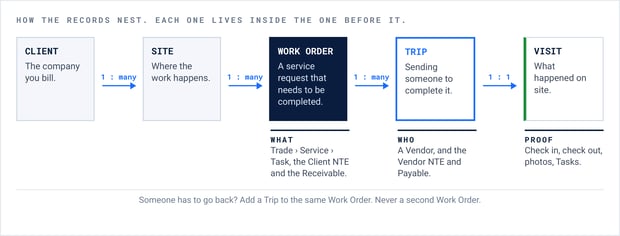
The return visit is a Trip.
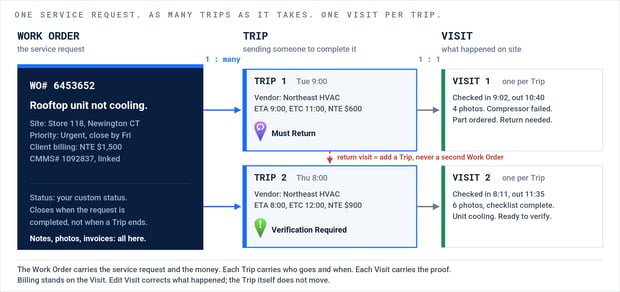
One service request, two Trips, one Visit per Trip. The Work Order closes when the request is completed, not when a Trip ends.
Trade, Service, Task.
| Level | What it is | Example |
| Trade | The kind of work. | HVAC |
| Service | The work being ordered. Rates hang off the Service. | Preventive Maintenance |
| Task | One step done on site, ticked at check-out. | Replace filters |
Say it the way the platform does.
| Word | What it means |
| Site | The physical location where the work is performed. |
| Client NTE, Vendor NTE | Not To Exceed. Two separate limits: what the Client will pay, and what the Vendor may charge. |
| Proposal | A quote, to a Client or from a Vendor, approved before the work is billed. |
| Receivable, Payable | The two sides of an Invoice: a Receivable to the Client, a Payable from the Vendor. |
| Purchase Order | A cost-control record on the Work Order. Not a billing method. |
| Agreement | The contract record behind Scheduled Services and seasonal billing. |
| Scheduled Service | Generates Work Orders on a schedule, such as preventive maintenance. |
| Action Filter | The filters above every list: Schedule, Verify Trips, Generate Invoices and the rest. Each one is a queue with an owner. |
| Check In, Check Out | The Service Provider's clock in and clock out on a Trip. |
| Verify | The review of a completed Trip before it can be billed. |
| Work Order Close | The date everything on the Work Order must be done by: the Client's deadline. |
| Trip Expiration | When the Trip comes off the technician's phone. Always before the Work Order Close. |
| Client Portal, Vendor Portal | Always say which one. |
Read next. How a Work Order Moves follows one Work Order through all seven phases. Action Filters shows how the work finds the right person.
Questions? Contact your Customer Success team or email support@utilizecore.com.