
| Where this fits: Workflow Universe › Layer 2 · Shared Mechanics | For: Admin, Biller | |
| Read first: Billing Methods Explained · Rate Hierarchy | Read next: Pricing Setup |
Applies to: Admin, finance, implementation | Web
Download the printable guide (PDF)
Structure
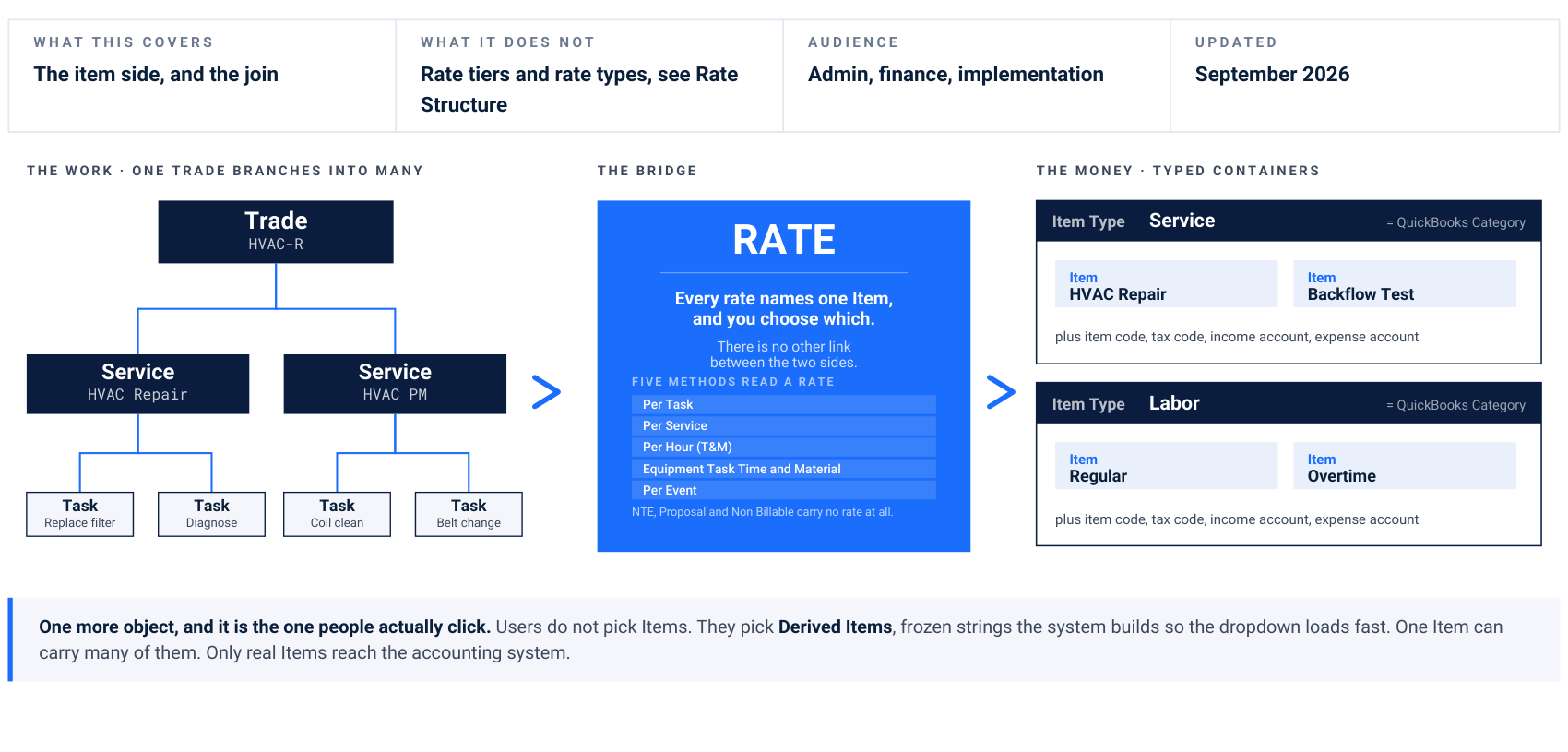
One more object, and it is the one people actually click. Users do not pick Items. They pick Derived Items, frozen strings the system builds so the dropdown loads fast. One Item can carry many of them. Only real Items reach the accounting system. The work · one trade branches into many
Trade Hvac-r
Service HVAC Repair
Service Hvac PM Task Replace filter Task Diagnose Task Coil clean Task Belt change The bridge
RATE
Every rate names one Item, and you choose which. There is no other link between the two sides. Five methods read a rate Per Task Per Service Per Hour (T&M) Equipment Task Time and Material Per Event NTE, Proposal and Non Billable carry no rate at all. The money · typed containers Item Type
Service = QuickBooks Category Item HVAC Repair Item Backflow Test plus item code, tax code, income account, expense account Item Type
Labor = QuickBooks Category Item Regular Item Overtime plus item code, tax code, income account, expense account
The one line read. Trade, Service and Task describe what the work is. Item Type and Item describe where the money goes. The Rate is the only wire between them, so a rate with no item, or the wrong item, is a line that cannot be priced or booked. Read with. Rate Structure owns the rate tiers. This document owns the item side.
Where structure attaches to the work order lifecycle.
Each phase of a work order locks in a different part of the structure, and the two halves only meet at the very end.
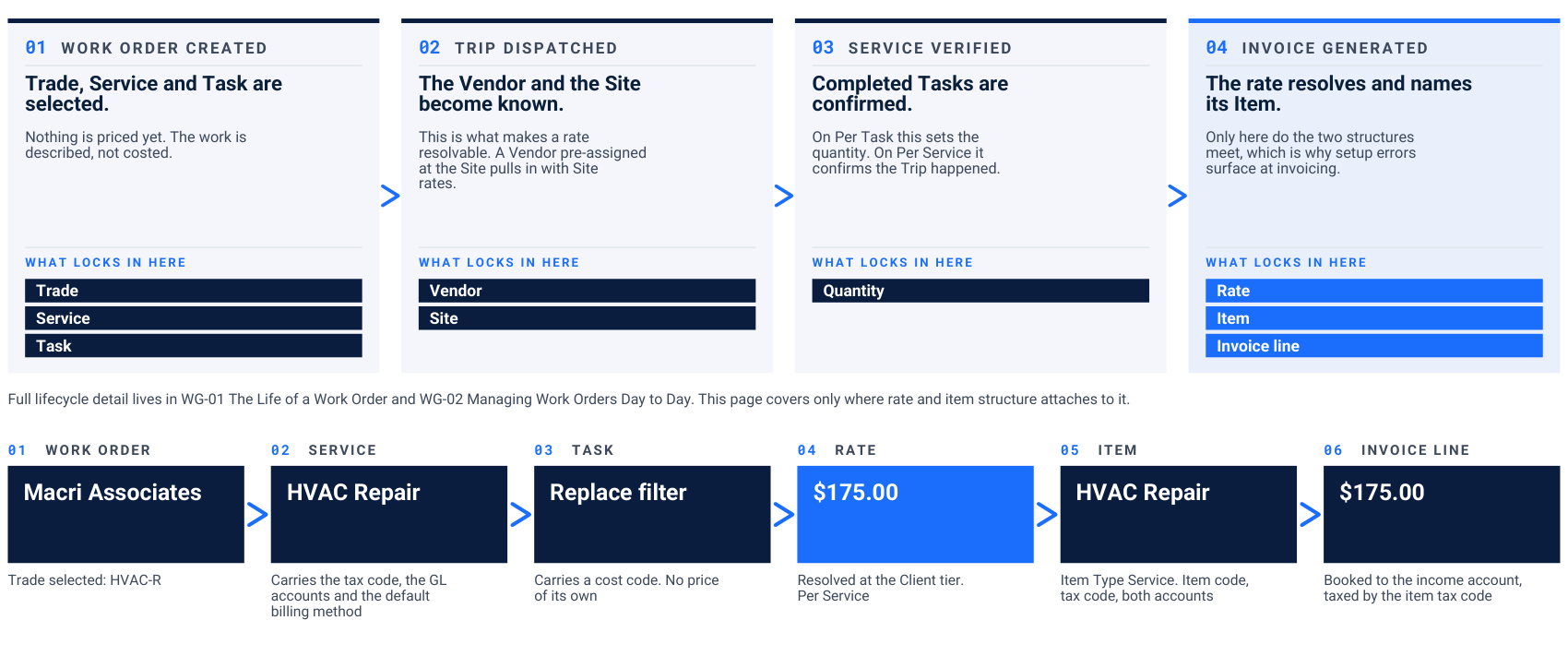
01. Work order created
Trade, Service and Task are selected. Nothing is priced yet. The work is described, not costed. What locks in here Trade Service Task
02. Trip dispatched
The Vendor and the Site become known. This is what makes a rate resolvable. A Vendor pre-assigned at the Site pulls in with Site rates. What locks in here Vendor Site
03. Service verified
Completed Tasks are confirmed. On Per Task this sets the quantity. On Per Service it confirms the Trip happened. What locks in here Quantity
04. Invoice generated
The rate resolves and names its Item. Only here do the two structures meet, which is why setup errors surface at invoicing. What locks in here Rate Item Invoice line Full lifecycle detail lives in WG-01 The Life of a Work Order and WG-02 Managing Work Orders Day to Day. This page covers only where rate and item structure attaches to it.
01. Work order
Macri Associates Trade selected: HVAC-R
02. Service
HVAC Repair Carries the tax code, the GL accounts and the default billing method
03. Task
Replace filter Carries a cost code. No price of its own
04. Rate
$175.00 Resolved at the Client tier. Per Service
05. Item
HVAC Repair Item Type Service. Item code, tax code, both accounts
06. Invoice line
$175.00 Booked to the income account, taxed by the item tax code
The seven objects, and what each one carries.
If two people mean different things by any of these words, the setup will be wrong.
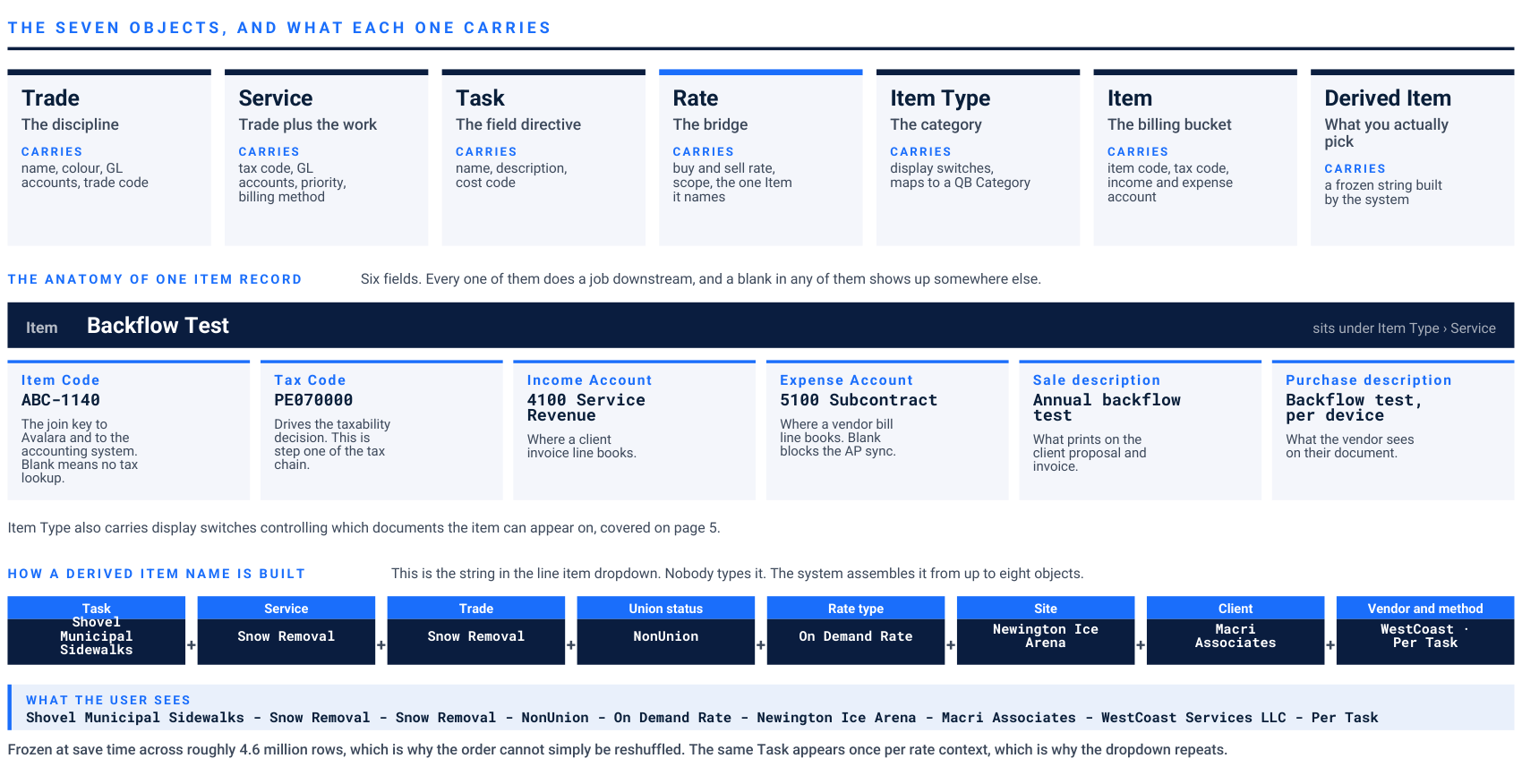
The seven objects, and what each one carries
Trade The discipline Carries name, colour, GL accounts, trade code
Service Trade plus the work Carries tax code, GL accounts, priority, billing method
Task The field directive Carries name, description, cost code
Rate The bridge Carries buy and sell rate, scope, the one Item it names
Item Type The category Carries display switches, maps to a QB Category
Item The billing bucket Carries item code, tax code, income and expense account
Derived Item What you actually pick Carries a frozen string built by the system The anatomy of one item record Six fields. Every one of them does a job downstream, and a blank in any of them shows up somewhere else. Item
Backflow Test sits under Item Type › Service Item Code ABC-1140 The join key to Avalara and to the accounting system. Blank means no tax lookup. Tax Code PE070000 Drives the taxability decision. This is step one of the tax chain. Income Account 4100 Service Revenue Where a client invoice line books. Expense Account 5100 Subcontract Where a vendor bill line books. Blank blocks the AP sync. Sale description Annual backflow test What prints on the client proposal and invoice. Purchase description Backflow test, per device What the vendor sees on their document. Item Type also carries display switches controlling which documents the item can appear on, covered on page 5. How a derived item name is built This is the string in the line item dropdown. Nobody types it. The system assembles it from up to eight objects. Task Shovel Municipal Sidewalks Service Snow Removal Trade Snow Removal Union status NonUnion Rate type On Demand Rate Site Newington Ice Arena Client Macri Associates Vendor and method WestCoast · Per Task What the user sees Shovel Municipal Sidewalks - Snow Removal - Snow Removal - NonUnion - On Demand Rate - Newington Ice Arena - Macri Associates - WestCoast Services LLC - Per Task Frozen at save time across roughly 4.6 million rows, which is why the order cannot simply be reshuffled. The same Task appears once per rate context, which is why the dropdown repeats.
The naming rule. A Service answers what work is being done. An Item answers where the dollars land. When a client asks for a new item because the work is slightly different, the answer is almost always a new service or a new task. Watch for. Item Type is the platform word. Item category is what clients and QuickBooks call the same thing.
One item record, and the string a biller actually picks.
Left, the Item form with every field the anatomy figure describes. Right, the Name dropdown on a Receivable line: the same Task four times, once per rate context.
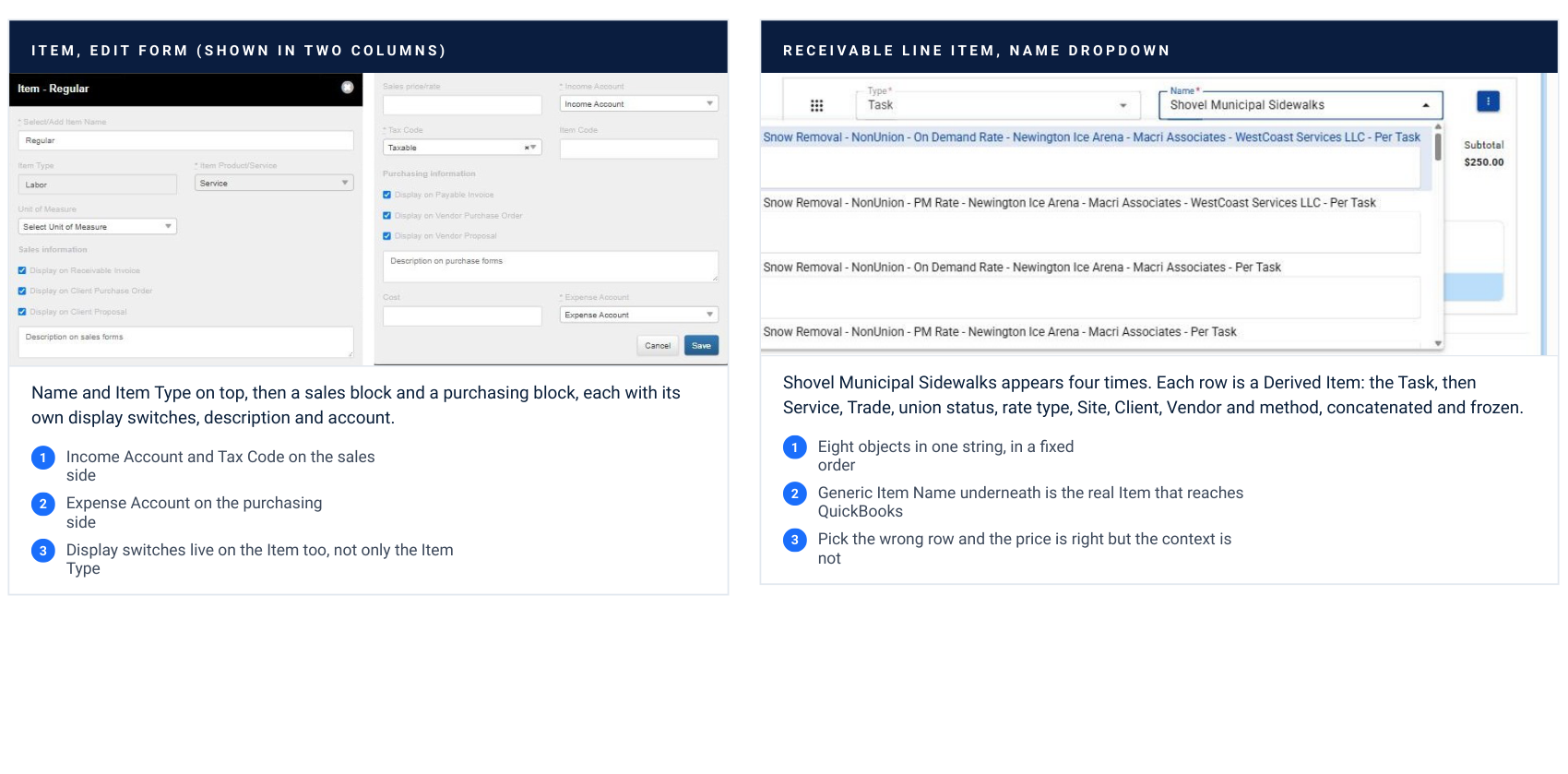
Name and Item Type on top, then a sales block and a purchasing block, each with its own display switches, description and account. Income Account and Tax Code on the sales side Expense Account on the purchasing side Display switches live on the Item too, not only the Item Type Receivable line item, name dropdown Shovel Municipal Sidewalks appears four times. Each row is a Derived Item: the Task, then Service, Trade, union status, rate type, Site, Client, Vendor and method, concatenated and frozen. Eight objects in one string, in a fixed order Generic Item Name underneath is the real Item that reaches QuickBooks Pick the wrong row and the price is right but the context is not
Why the dropdown repeats. Nobody created four items. One Task has four rate rows, one per rate context, and each row gets its own Derived Item so the dropdown can load without a lookup. Only the Generic Item Name is a real Item. Captured on evanstestcompany, Receivable 0247.
The billing method picks the item type. You can overrule it.
Eight billing methods. Five read a rate table, three do not, and the item each rate points at stopped being fixed in August.
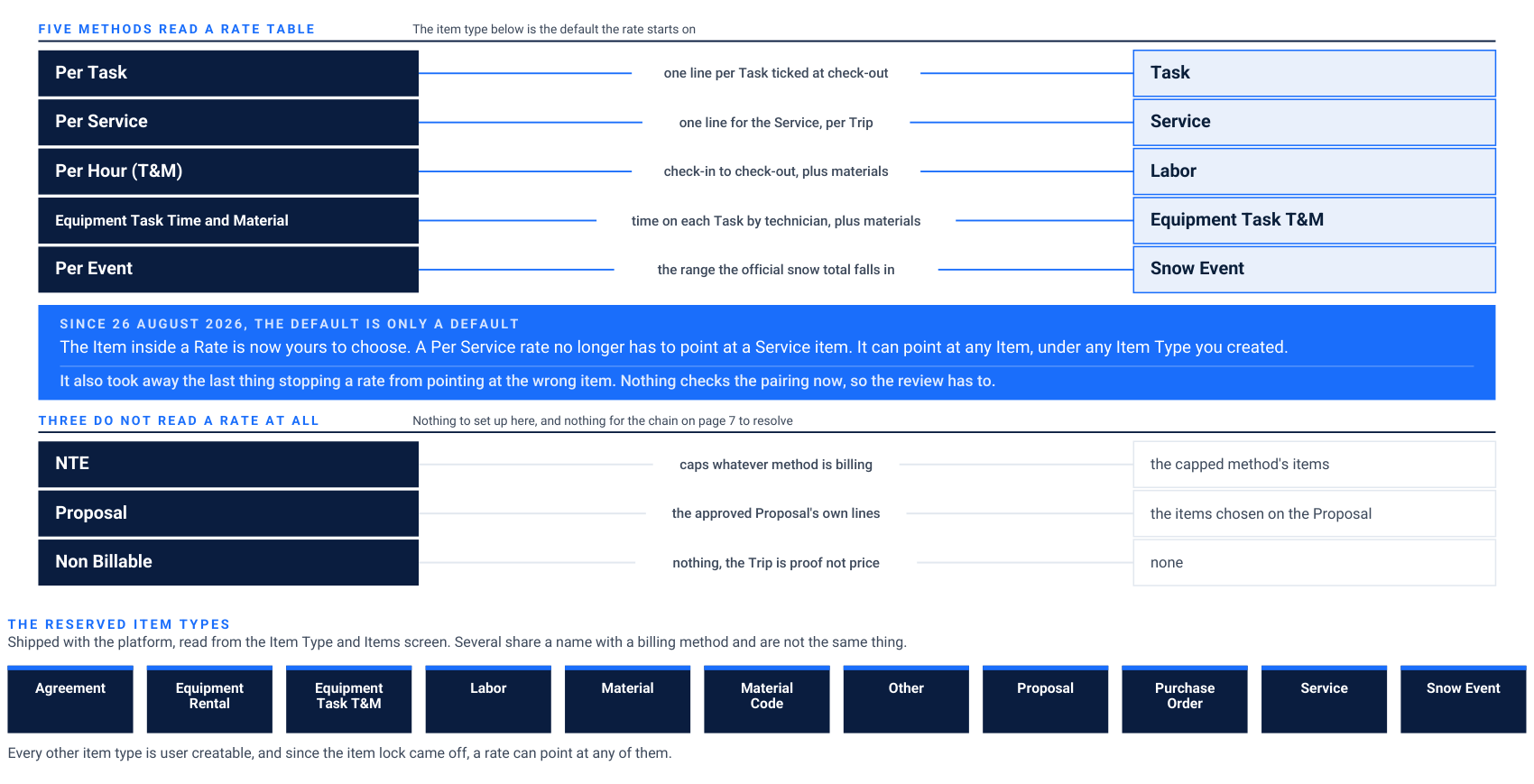
Five methods read a rate table The item type below is the default the rate starts on
Per Task one line per Task ticked at check-out
Task
Per Service one line for the Service, per Trip
Service
Per Hour (T&M) check-in to check-out, plus materials
Labor Equipment Task Time and Material time on each Task by technician, plus materials
Equipment Task T&M
Per Event the range the official snow total falls in
Snow Event Since 26 august 2026, the default is only a default The Item inside a Rate is now yours to choose. A Per Service rate no longer has to point at a Service item. It can point at any Item, under any Item Type you created. It also took away the last thing stopping a rate from pointing at the wrong item. Nothing checks the pairing now, so the review has to. Three do not read a rate at all Nothing to set up here, and nothing for the chain on page 7 to resolve
NTE caps whatever method is billing the capped method's items
Proposal the approved Proposal's own lines the items chosen on the Proposal
Non Billable nothing, the Trip is proof not price none The reserved item types Shipped with the platform, read from the Item Type and Items screen. Several share a name with a billing method and are not the same thing. Agreement Equipment Rental Equipment Task T&M Labor Material Material Code Other Proposal Purchase Order Service Snow Event Every other item type is user creatable, and since the item lock came off, a rate can point at any of them.
What the dropdown will not tell you. Technician, Purchase Order and Inspection appear in billing method dropdowns and are not billing methods. A purchase order is a cost control record. Agreement is an item type, not a method: a seasonal contract bills its fixed amount through the Scheduled Service Agreement while its Trips run Non Billable. See also. WG-11 Understanding Billing Methods covers each method in full.
The Item Type screen, and what it carries.
The display switches under each name are the documents the type can appear on. The two account columns are the QuickBooks mapping. A red delete icon means someone created that type.
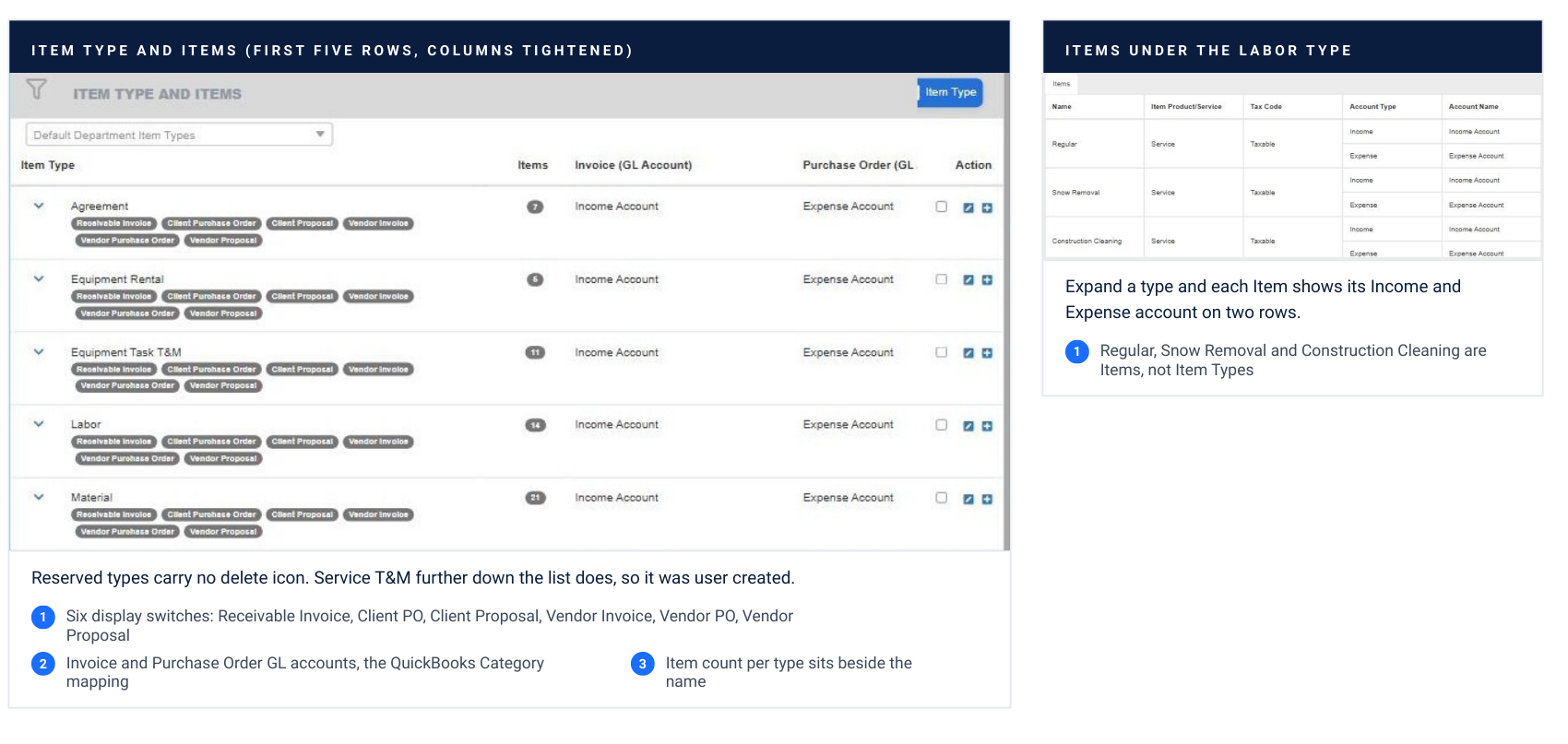
Reserved types carry no delete icon. Service T&M further down the list does, so it was user created. Six display switches: Receivable Invoice, Client PO, Client Proposal, Vendor Invoice, Vendor PO, Vendor Proposal Invoice and Purchase Order GL accounts, the QuickBooks Category mapping Item count per type sits beside the name Items under the labor type Expand a type and each Item shows its Income and Expense account on two rows. Regular, Snow Removal and Construction Cleaning are Items, not Item Types
What this corrects. The reserved list on page 5 was rebuilt from this screen. Equipment Rental, Material, Material Code and Other are reserved; Task and Trip Charge were not visible as reserved types on this tenant and have been removed from the list until confirmed. Captured on evanstestcompany.
Every invoice line runs three lookups.
Each one asks a different question. Each one starts at the most specific level and falls until it hits an answer.
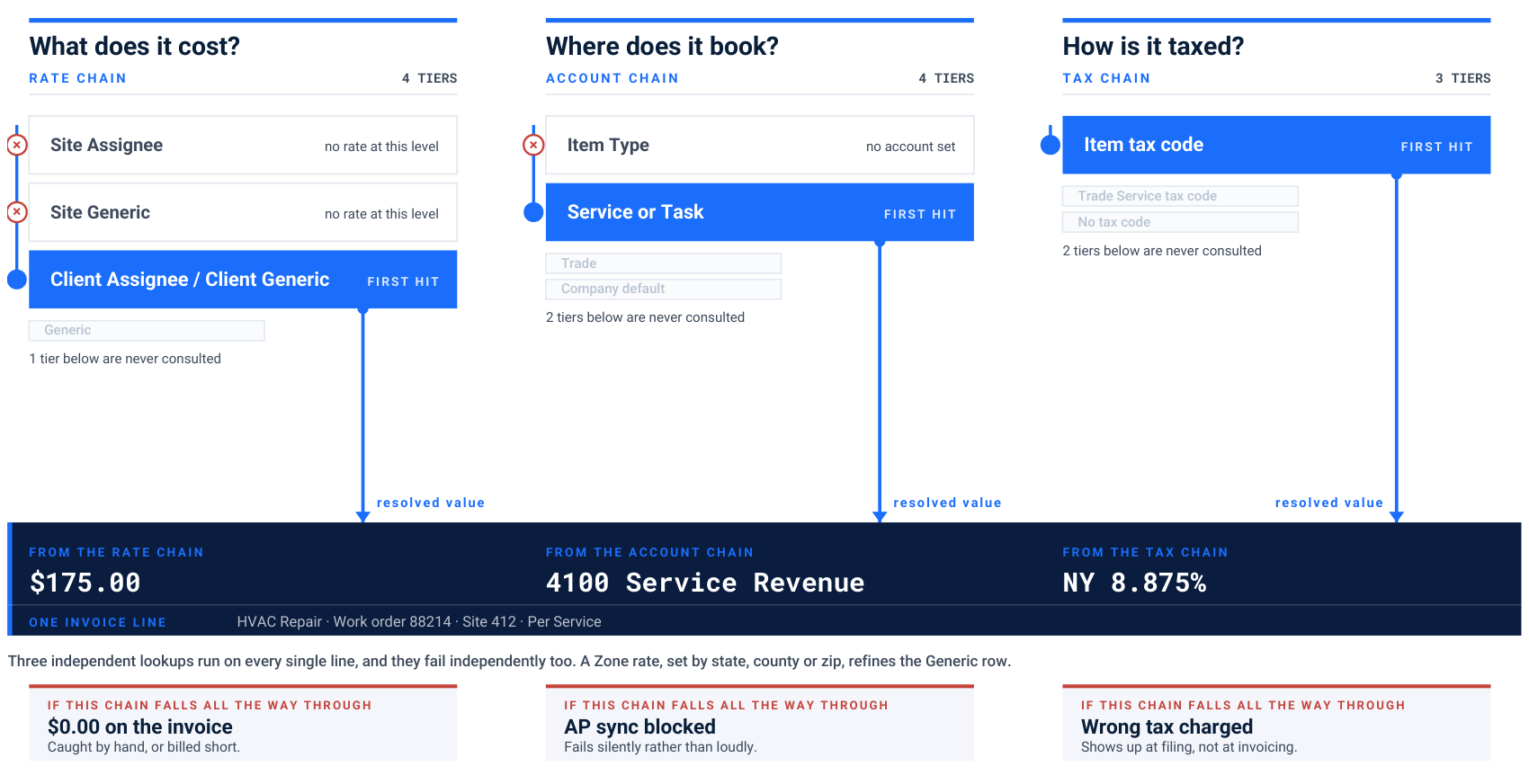
What does it cost? Rate chain 4 tiers
Site Assignee no rate at this level
Site Generic no rate at this level
Client Assignee / Client Generic First hit Generic 1 tier below are never consulted resolved value
Where does it book? Account chain 4 tiers
Item Type no account set
Service or Task First hit Trade Company default 2 tiers below are never consulted resolved value
How is it taxed? Tax chain 3 tiers
Item tax code First hit Trade Service tax code No tax code 2 tiers below are never consulted resolved value From the rate chain
$175.00 From the account chain
4100 Service Revenue From the tax chain
NY 8.875% One invoice line HVAC Repair · Work order 88214 · Site 412 · Per Service Three independent lookups run on every single line, and they fail independently too. A Zone rate, set by state, county or zip, refines the Generic row. If this chain falls all the way through
$0.00 on the invoice Caught by hand, or billed short. If this chain falls all the way through
AP sync blocked Fails silently rather than loudly. If this chain falls all the way through
Wrong tax charged Shows up at filing, not at invoicing.
Why this matters commercially. A $0 line item is almost never a bug. One of these three chains fell all the way through, or the user picked the wrong item out of several sharing a name. Roughly nine out of ten $0 lines trace back to item setup, and each one is revenue caught by hand or billed short. Rate tiers are summarized here and owned in full by Rate Structure. The account and tax chains are documented only here.
Where the rate ladder shows itself.
Rates and Assignees carries a Rate Level on every row, and expanding a row shows the Derived Items that rate generated.
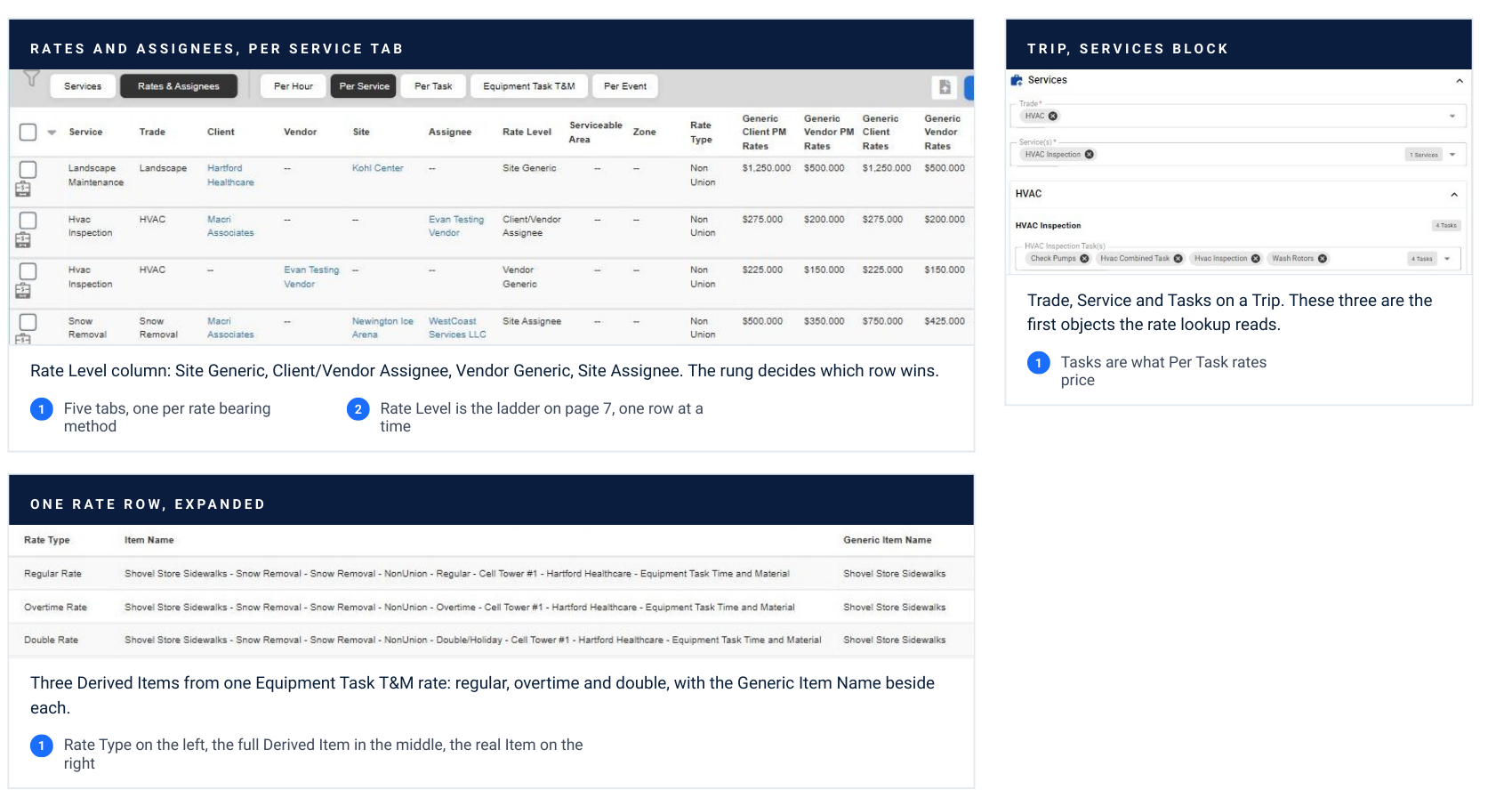
Rates and assignees, per service tab Rate Level column: Site Generic, Client/Vendor Assignee, Vendor Generic, Site Assignee. The rung decides which row wins. Five tabs, one per rate bearing method Rate Level is the ladder on page 7, one row at a time Trip, services block Trade, Service and Tasks on a Trip. These three are the first objects the rate lookup reads. Tasks are what Per Task rates price One rate row, expanded Three Derived Items from one Equipment Task T&M rate: regular, overtime and double, with the Generic Item Name beside each. Rate Type on the left, the full Derived Item in the middle, the real Item on the right
The link made visible. This is the only screen where the rate, the Derived Item and the real Item sit on one row. If a $0 line needs explaining, start here, on the rate that should have produced it. Captured on evanstestcompany.
One invoice, and where every field came from.
Nothing on this invoice was typed by hand except the quantities the field captured. Each column traces back to a different object.
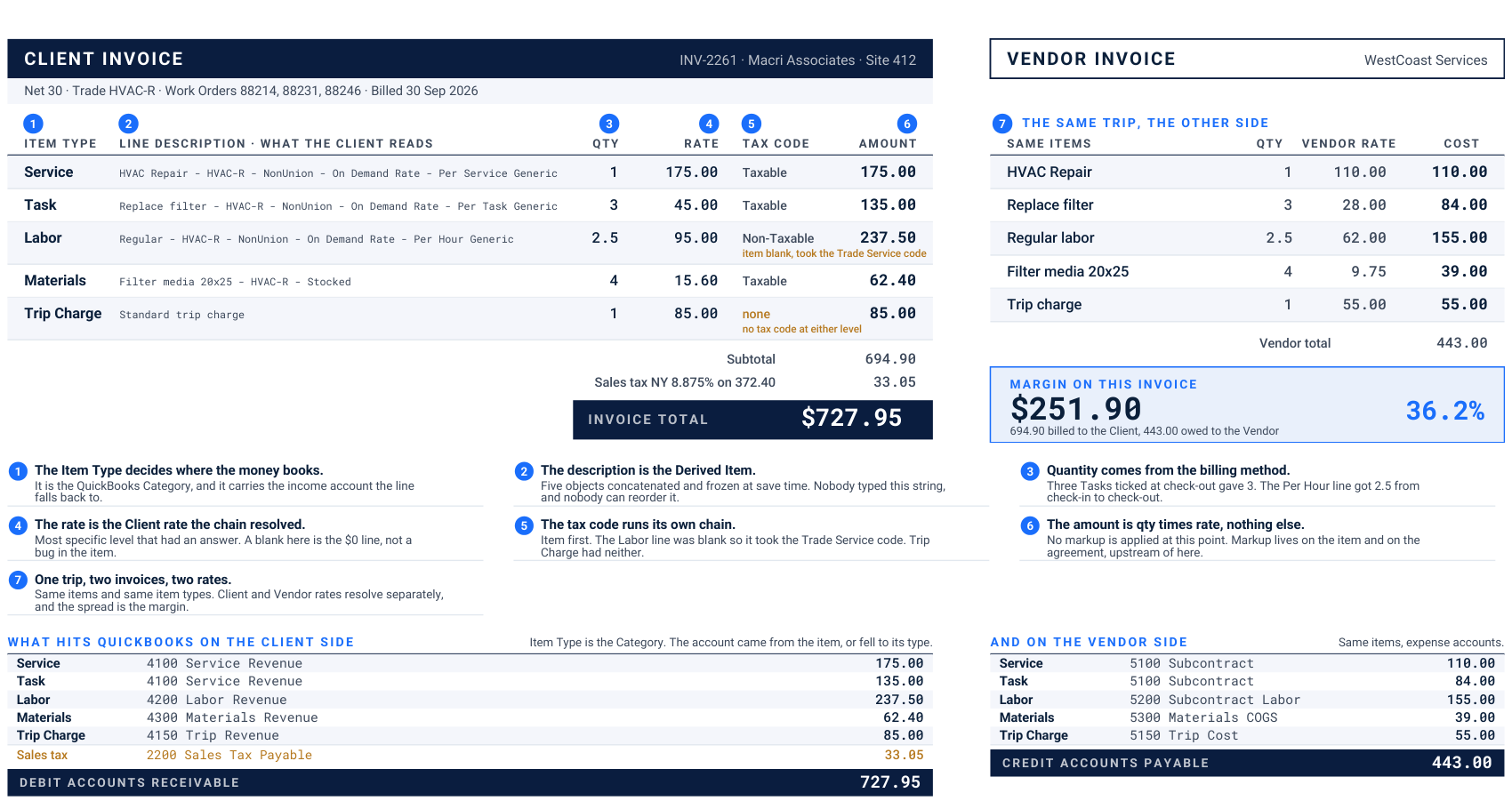
CLIENT INVOICE INV-2261 · Macri Associates · Site 412 Net 30 · Trade HVAC-R · Work Orders 88214, 88231, 88246 · Billed 30 Sep 2026 Item type Line description · what the client reads Qty Rate Tax code Amount Service HVAC Repair - HVAC-R - NonUnion - On Demand Rate - Per Service Generic
1. 175.00 Taxable 175.00 Task Replace filter - HVAC-R - NonUnion - On Demand Rate - Per Task Generic
3. 45.00 Taxable 135.00 Labor Regular - HVAC-R - NonUnion - On Demand Rate - Per Hour Generic 2.5 95.00 Non-Taxable 237.50 item blank, took the Trade Service code Materials Filter media 20x25 - HVAC-R - Stocked
4. 15.60 Taxable 62.40 Trip Charge Standard trip charge
1. 85.00 none 85.00 no tax code at either level Subtotal 694.90 Sales tax NY 8.875% on 372.40 33.05 Invoice total
$727.95 VENDOR INVOICE WestCoast Services The same trip, the other side Same items Qty Vendor rate Cost HVAC Repair
1. 110.00 110.00 Replace filter
3. 28.00 84.00 Regular labor 2.5 62.00 155.00 Filter media 20x25
4. 9.75 39.00 Trip charge
1. 55.00 55.00 Vendor total 443.00 Margin on this invoice
$251.90 36.2% 694.90 billed to the Client, 443.00 owed to the Vendor The Item Type decides where the money books. It is the QuickBooks Category, and it carries the income account the line falls back to. The description is the Derived Item. Five objects concatenated and frozen at save time. Nobody typed this string, and nobody can reorder it. Quantity comes from the billing method. Three Tasks ticked at check-out gave 3. The Per Hour line got 2.5 from check-in to check-out. The rate is the Client rate the chain resolved. Most specific level that had an answer. A blank here is the $0 line, not a bug in the item. The tax code runs its own chain. Item first. The Labor line was blank so it took the Trade Service code. Trip Charge had neither. The amount is qty times rate, nothing else. No markup is applied at this point. Markup lives on the item and on the agreement, upstream of here. One trip, two invoices, two rates. Same items and same item types. Client and Vendor rates resolve separately, and the spread is the margin. What hits quickbooks on the client side Item Type is the Category. The account came from the item, or fell to its type. Service 4100 Service Revenue 175.00 Task 4100 Service Revenue 135.00 Labor 4200 Labor Revenue 237.50 Materials 4300 Materials Revenue 62.40 Trip Charge 4150 Trip Revenue 85.00 Sales tax 2200 Sales Tax Payable 33.05 Debit accounts receivable
727.95 And on the vendor side Same items, expense accounts. Service 5100 Subcontract 110.00 Task 5100 Subcontract 84.00 Labor 5200 Subcontract Labor 155.00 Materials 5300 Materials COGS 39.00 Trip Charge 5150 Trip Cost 55.00 Credit accounts payable
443.00
Read a bad invoice this way. Find the wrong column and it names the object to go fix. Wrong description is the item, wrong rate is the rate chain, wrong tax is the tax code, wrong quantity is the billing method. Fictitious. Macri Associates and WestCoast Services are demo records, and the figures are illustrative.
A proposal uses the same items, and ignores the rate table.
This is the one place where the chain on page 7 does not decide the price. The items are identical. The pricing is not, and the labor line proves it.
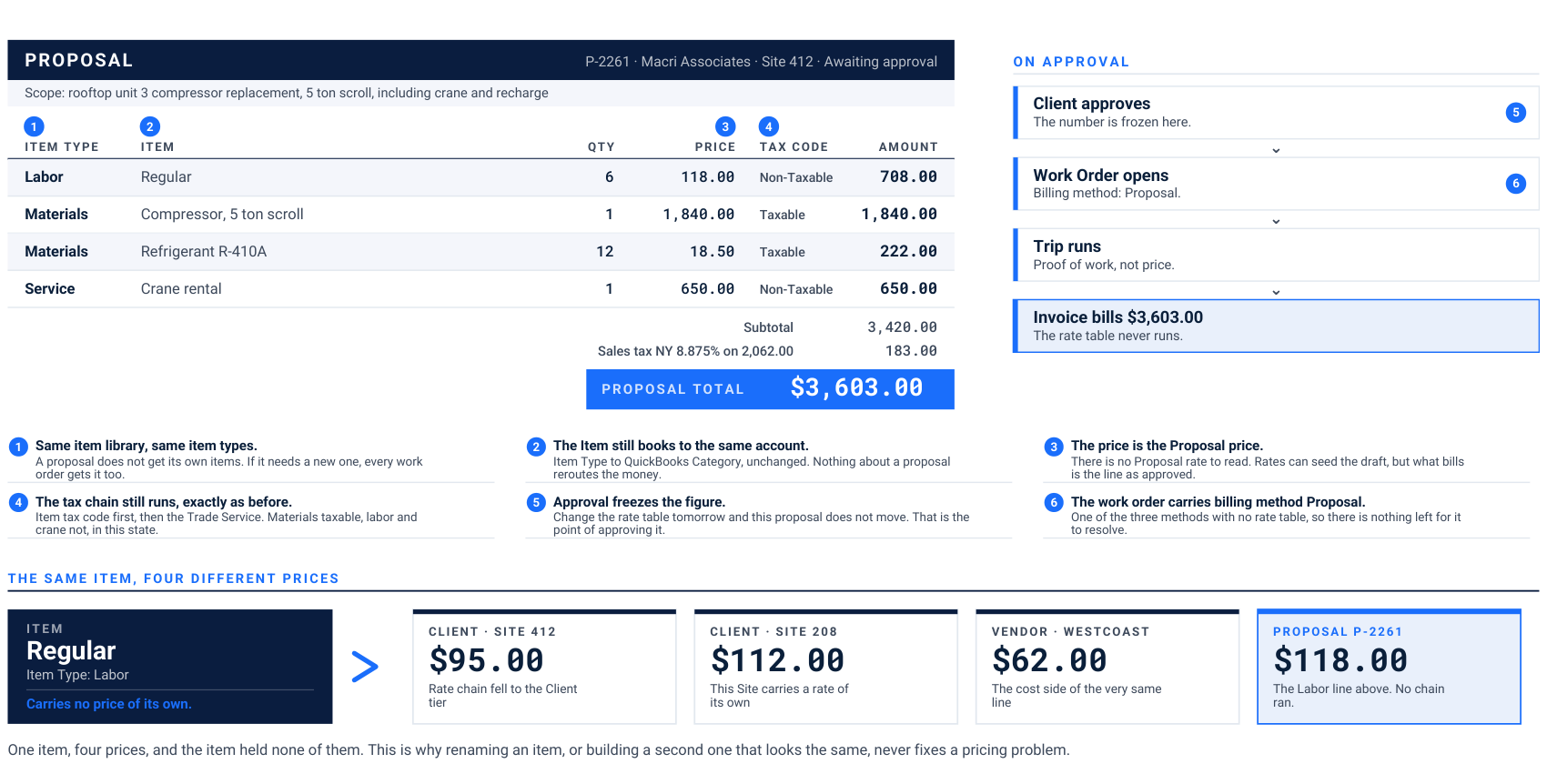
PROPOSAL P-2261 · Macri Associates · Site 412 · Awaiting approval Scope: rooftop unit 3 compressor replacement, 5 ton scroll, including crane and recharge Item type Item Qty Price Tax code Amount Labor Regular
6. 118.00 Non-Taxable 708.00 Materials Compressor, 5 ton scroll
1. 1,840.00 Taxable 1,840.00 Materials Refrigerant R-410A
12. 18.50 Taxable 222.00 Service Crane rental
1. 650.00 Non-Taxable 650.00 Subtotal 3,420.00 Sales tax NY 8.875% on 2,062.00 183.00 Proposal total
$3,603.00 On approval Client approves The number is frozen here. Work Order opens Billing method: Proposal. Trip runs Proof of work, not price. Invoice bills $3,603.00 The rate table never runs. Same item library, same item types. A proposal does not get its own items. If it needs a new one, every work order gets it too. The Item still books to the same account. Item Type to QuickBooks Category, unchanged. Nothing about a proposal reroutes the money. The price is the Proposal price. There is no Proposal rate to read. Rates can seed the draft, but what bills is the line as approved. The tax chain still runs, exactly as before. Item tax code first, then the Trade Service. Materials taxable, labor and crane not, in this state. Approval freezes the figure. Change the rate table tomorrow and this proposal does not move. That is the point of approving it. The work order carries billing method Proposal. One of the three methods with no rate table, so there is nothing left for it to resolve. The same item, four different prices Item
Regular Item Type: Labor Carries no price of its own. Client · site 412
$95.00 Rate chain fell to the Client tier Client · site 208
$112.00 This Site carries a rate of its own Vendor · westcoast
$62.00 The cost side of the very same line Proposal p-2261
$118.00 The Labor line above. No chain ran. One item, four prices, and the item held none of them. This is why renaming an item, or building a second one that looks the same, never fixes a pricing problem.
Why proposals go wrong. Teams build a parallel set of proposal items so the pricing looks right on the quote. Now the same work books to two different accounts depending on how it was sold, and the revenue report stops reconciling. Use one library and let the proposal price differ. See also. The proposal lifecycle guide covers approval, revision and conversion in full.
The worked examples, on screen.
A real Receivable line and a real Proposal line from the test tenant, beside the fictitious ones on pages 9 and 10.
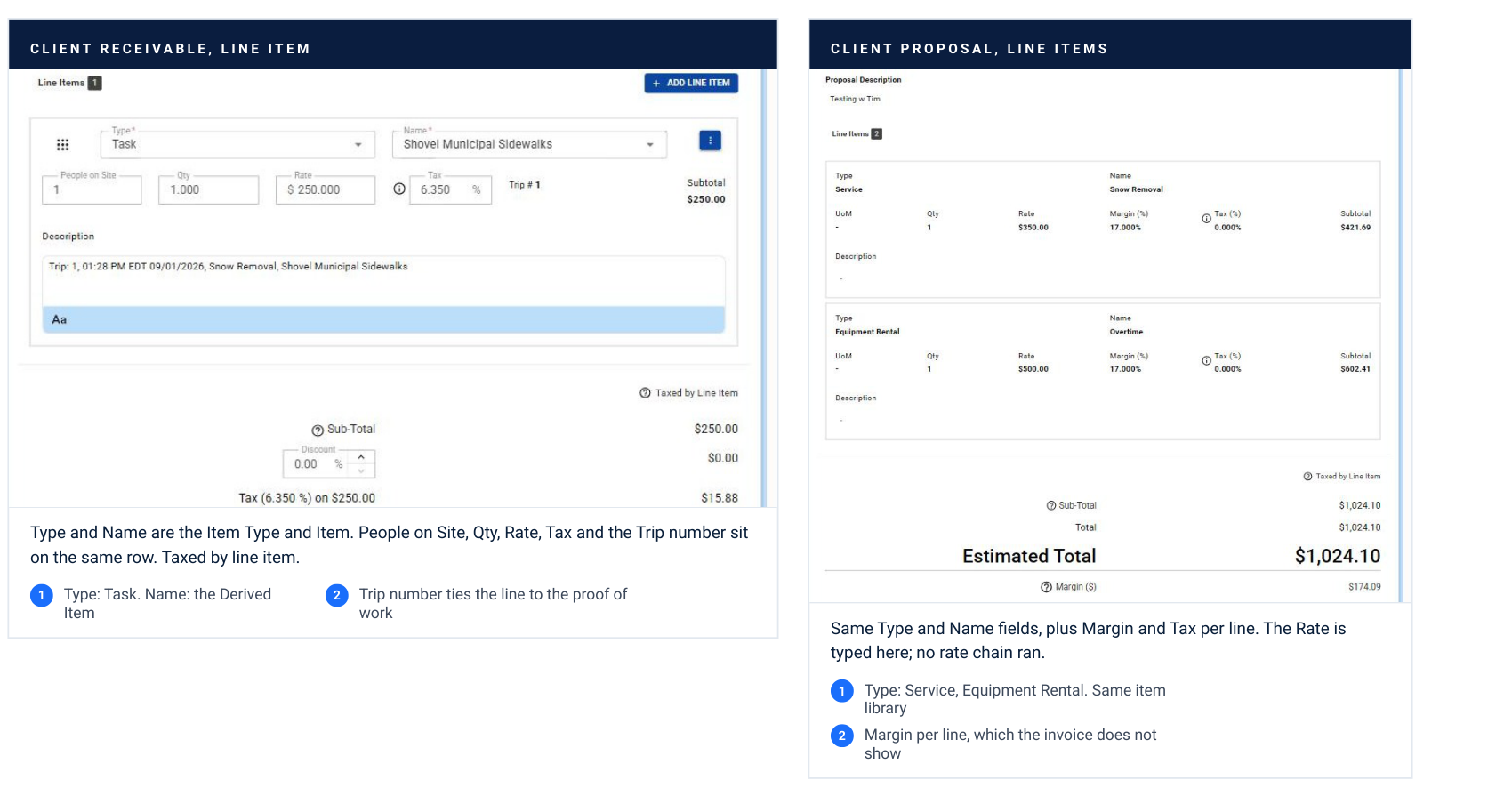
Client receivable, line item Type and Name are the Item Type and Item. People on Site, Qty, Rate, Tax and the Trip number sit on the same row. Taxed by line item. Type: Task. Name: the Derived Item Trip number ties the line to the proof of work Client proposal, line items Same Type and Name fields, plus Margin and Tax per line. The Rate is typed here; no rate chain ran. Type: Service, Equipment Rental. Same item library Margin per line, which the invoice does not show
Read them side by side. The two screens share the Item Type and Item fields and nothing else about the price. The invoice line resolved a rate. The proposal line was typed. Same items, different source of the number. Captured on evanstestcompany, Receivable 0247 and Proposal 76993.
Build it in this order, and the five ways it goes wrong.
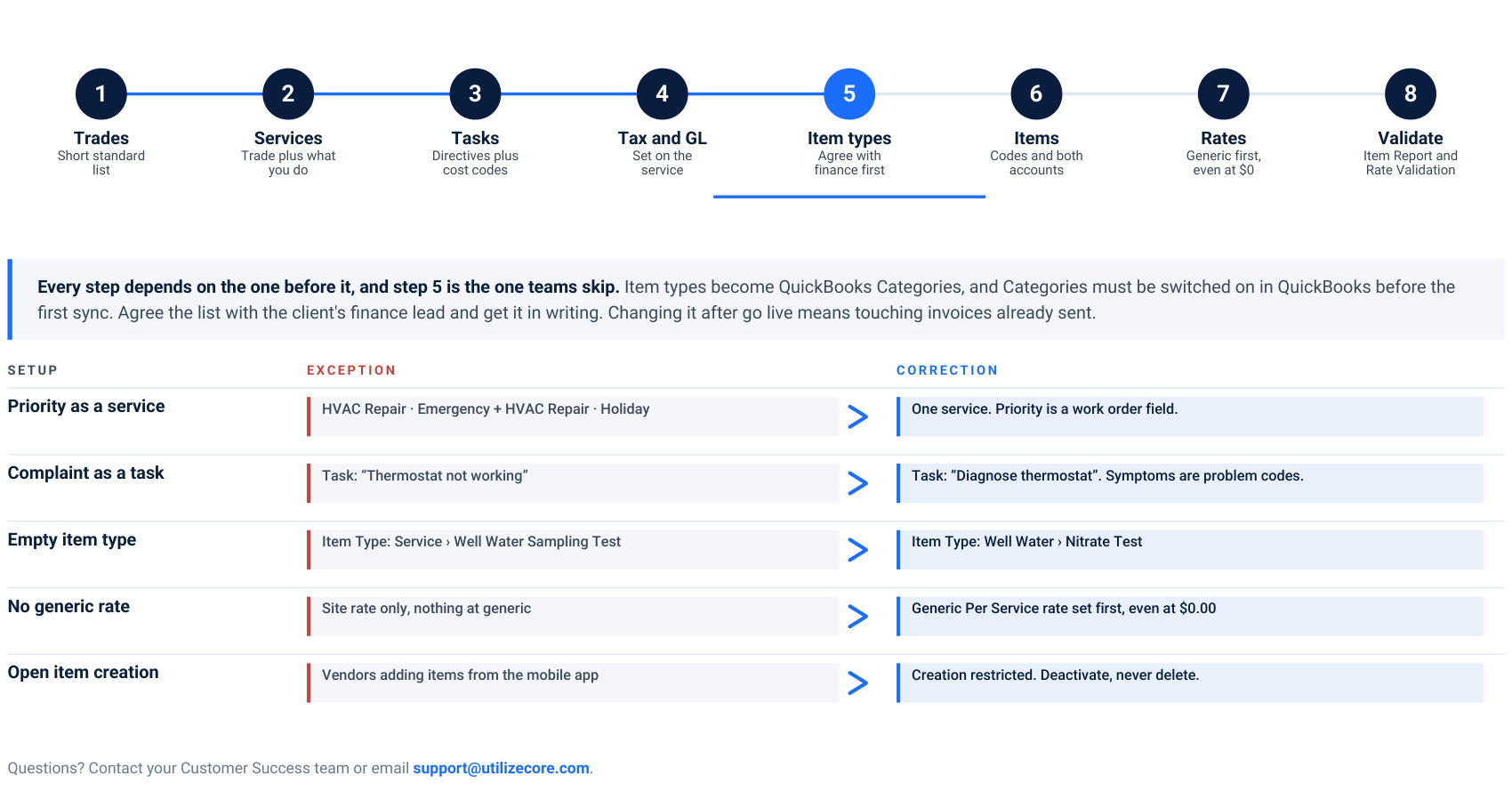
Every step depends on the one before it, and step 5 is the one teams skip. Item types become QuickBooks Categories, and Categories must be switched on in QuickBooks before the first sync. Agree the list with the client's finance lead and get it in writing. Changing it after go live means touching invoices already sent.
1. Trades Short standard list
2. Services Trade plus what you do
3. Tasks Directives plus cost codes
4. Tax and GL Set on the service
5. Item types Agree with finance first
6. Items Codes and both accounts
7. Rates Generic first, even at $0
8. Validate Item Report and Rate Validation Setup Exception Correction
Priority as a service HVAC Repair · Emergency + HVAC Repair · Holiday One service. Priority is a work order field.
Complaint as a task Task: “Thermostat not working” Task: “Diagnose thermostat”. Symptoms are problem codes.
Empty item type Item Type: Service › Well Water Sampling Test Item Type: Well Water › Nitrate Test
No generic rate Site rate only, nothing at generic Generic Per Service rate set first, even at $0.00
Open item creation Vendors adding items from the mobile app Creation restricted. Deactivate, never delete.
Questions? Contact your Customer Success team or email support@utilizecore.com.