
| Where this fits: Workflow Universe › Layer 1 · Foundation | For: Biller, Admin | |
| Read first: The Workflow Universe: How the Guides Fit | Read next: Rate Hierarchy · Rate and Item Structure |
Applies to: Department heads, billers, dispatchers | Web
Download the printable guide (PDF)
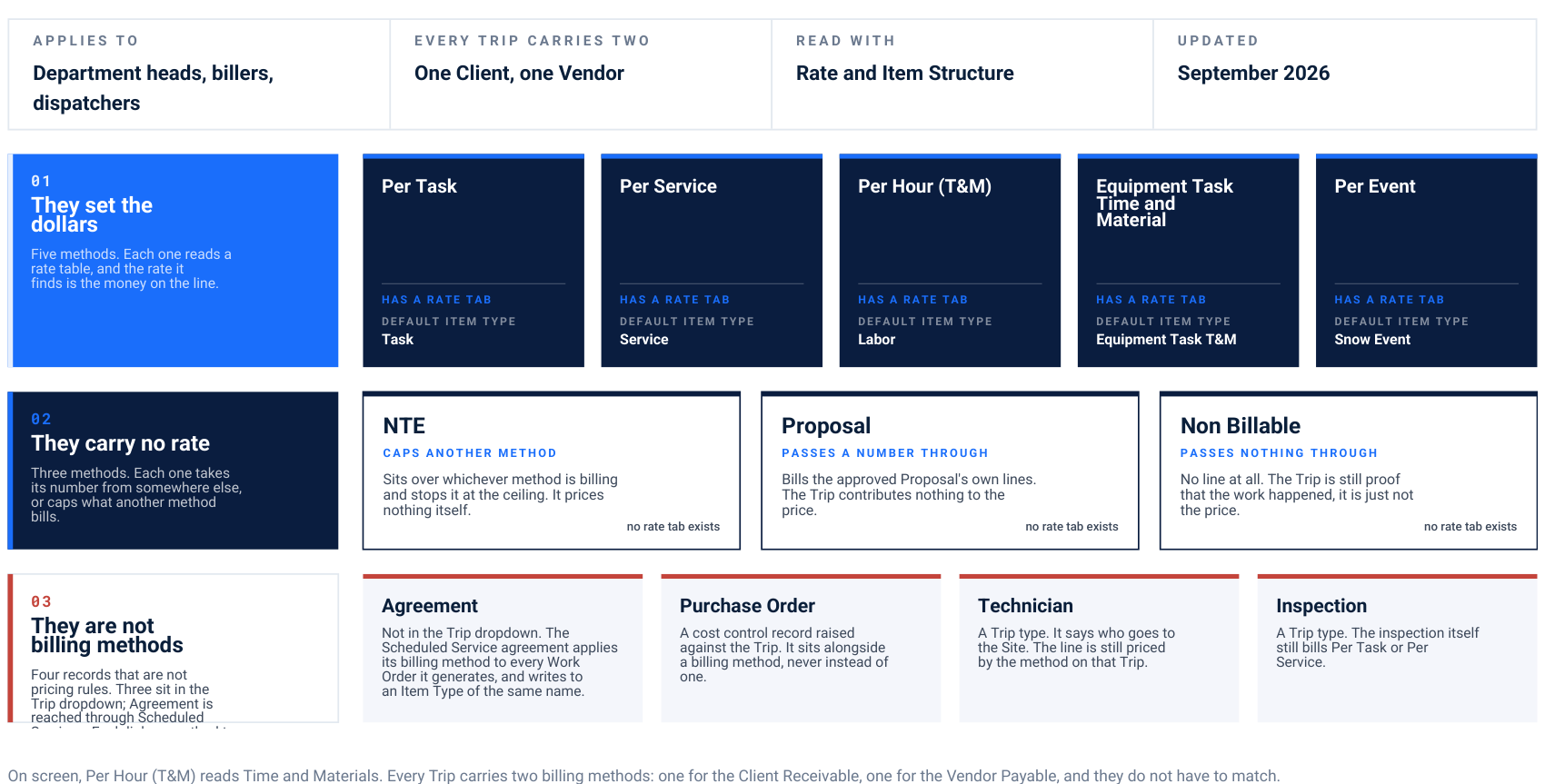
On screen, Per Hour (T&M) reads Time and Materials. Every Trip carries two billing methods: one for the Client Receivable, one for the Vendor Payable, and they do not have to match.
01. They set the dollars Five methods. Each one reads a rate table, and the rate it finds is the money on the line.
Per Task Has a rate tab Default item type Task
Per Service Has a rate tab Default item type Service
Per Hour (T&M) Has a rate tab Default item type Labor
Equipment Task Time and Material Has a rate tab Default item type Equipment Task T&M
Per Event Has a rate tab Default item type Snow Event
02. They carry no rate Three methods. Each one takes its number from somewhere else, or caps what another method bills.
NTE Caps another method Sits over whichever method is billing and stops it at the ceiling. It prices nothing itself. no rate tab exists
Proposal Passes a number through Bills the approved Proposal's own lines. The Trip contributes nothing to the price. no rate tab exists
Non Billable Passes nothing through No line at all. The Trip is still proof that the work happened, it is just not the price. no rate tab exists
03. They are not billing methods Four records that are not pricing rules. Three sit in the Trip dropdown; Agreement is reached through Scheduled
Agreement Not in the Trip dropdown. The Scheduled Service agreement applies its billing method to every Work Order it generates, and writes to an Item Type of the same name.
Purchase Order A cost control record raised against the Trip. It sits alongside a billing method, never instead of one.
Technician A Trip type. It says who goes to the Site. The line is still priced by the method on that Trip.
Inspection A Trip type. The inspection itself still bills Per Task or Per Service.
Read the three rows this way. Row one is where the money is decided. Row two moves a number that was decided somewhere else, or puts a ceiling on it. Row three is not pricing at all, it is the record that carries a method onto a Service. Seasonal is not a method. A fixed contract bills through a Scheduled Service agreement while its Trips run Non Billable.
The same list, on a Trip.
Client Billing Method on a new Trip in the test tenant. Ten entries. Seven of the eight methods are here, three of the four non-methods are here, and two things on page 1 are not.
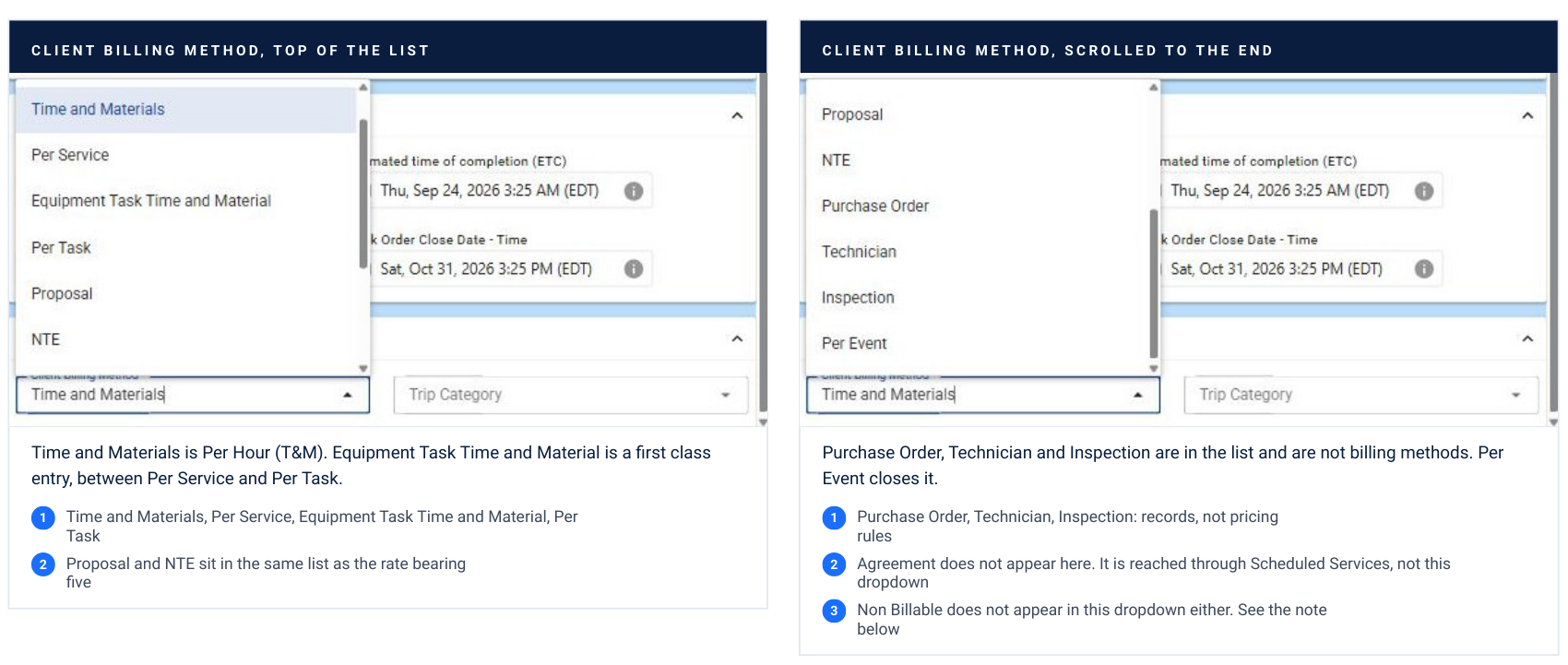
Client billing method, top of the list Time and Materials is Per Hour (T&M). Equipment Task Time and Material is a first class entry, between Per Service and Per Task. Time and Materials, Per Service, Equipment Task Time and Material, Per Task Proposal and NTE sit in the same list as the rate bearing five Client billing method, scrolled to the end Purchase Order, Technician and Inspection are in the list and are not billing methods. Per Event closes it. Purchase Order, Technician, Inspection: records, not pricing rules Agreement does not appear here. It is reached through Scheduled Services, not this dropdown Non Billable does not appear in this dropdown either. See the note below
What each one bills, and what breaks it.
The first five read the Trip against a rate. NTE caps whatever is billed. Proposal reads the quote instead of the Trip. Non Billable reads nothing.
| Method | The contract word | The line on the invoice | What breaks it |
|---|---|---|---|
| Per Task Reads a rate | Per push, per application, per lot, per sidewalk, a price list by activity. In snow, per push is Per Task. | One line per Task ticked at check-out, at that Task's rate on the Site. Unticked Tasks do not bill. | A Task with no rate on this Site gives a $0 line. A Service Provider who ticks every Task by habit. |
| Per Service Reads a rate | Per visit, per trip, a flat amount each time the truck comes, whatever it does. Not per push. | One line for the Service, per Trip. Quantity is editable on the invoice; the price does not depend on Tasks. | No Vendor assigned to the Site with a priority, so the Per Service rate never populates. Assign first, price second. |
| Per Hour (T&M) Reads a rate | Time and materials, hourly plus parts, on-demand repair. Reads Time and Materials on screen. | Check-in to check-out at the labor rate, regular, overtime or double, plus material lines, up to the Client NTE. | A check-in from the road, or an Edit Visit with guessed times. The hours are the invoice. |
| Equipment Task Time and Material Reads a rate | Time billed against each Task rather than the visit. Equipment repair where every task is clocked on its own. | One labor line per Task, from Task check-in to Task check-out or an entered total, multiplied by the technicians on that Task. Materials come from the repair form. | No trade service rate means no line items at all, where Per Hour would at least give you blank ones. Minimum billable hours on the rate can override the clock. |
| Per Event Reads a rate | Snow range dependent: priced by the range the snow total falls in. Per inch is one inch ranges. | The range the official snow total falls in, at that range's price, plus any Per Task Flat or Per Task Range add-ons. | A Site with no weather id. Ranges with a gap, or that stop short of the storm. A flat per service price loaded here by mistake. |
| NTE No rate | Not to exceed, a cap, a fixed monthly pickup where the Trip count must not change the amount. | Whatever is billed, up to the ceiling. Above it the Vendor invoice is blocked unless someone with the override permission approves. | Vendor NTE left blank at dispatch, so there is no cap. Markup counts toward the check and can hide an exceedance. |
| Proposal No rate | Quote first, approved estimate, anything the Client signs before the work starts. | The approved Proposal's own lines. The Trip contributes nothing. Profitability is read at the Work Order. | Work done before the Proposal was accepted. A change on site with no revised Proposal. |
| Non Billable No rate | Included, covered by the seasonal, warranty, or the event Work Orders under a fixed monthly agreement. | None. The Trip still needs check-in, check-out, photos and verification. It is the proof, not the price. | Forgetting it. Both the agreement and the event Trips reach accounting and the Client is billed twice. |
The pattern behind the failures. Six of these eight break the same way: the method was set before the rate existed. The method populates from a default and looks correct on the Trip, then produces a $0 line, or no line at all, days later at invoicing. Set the rate first. Then set the method, then run one test Trip end to end.
Two separate questions: which method, and which rate.
The method inherits down four levels. The rate is found on its own ladder at invoicing. Neither one checks the other.
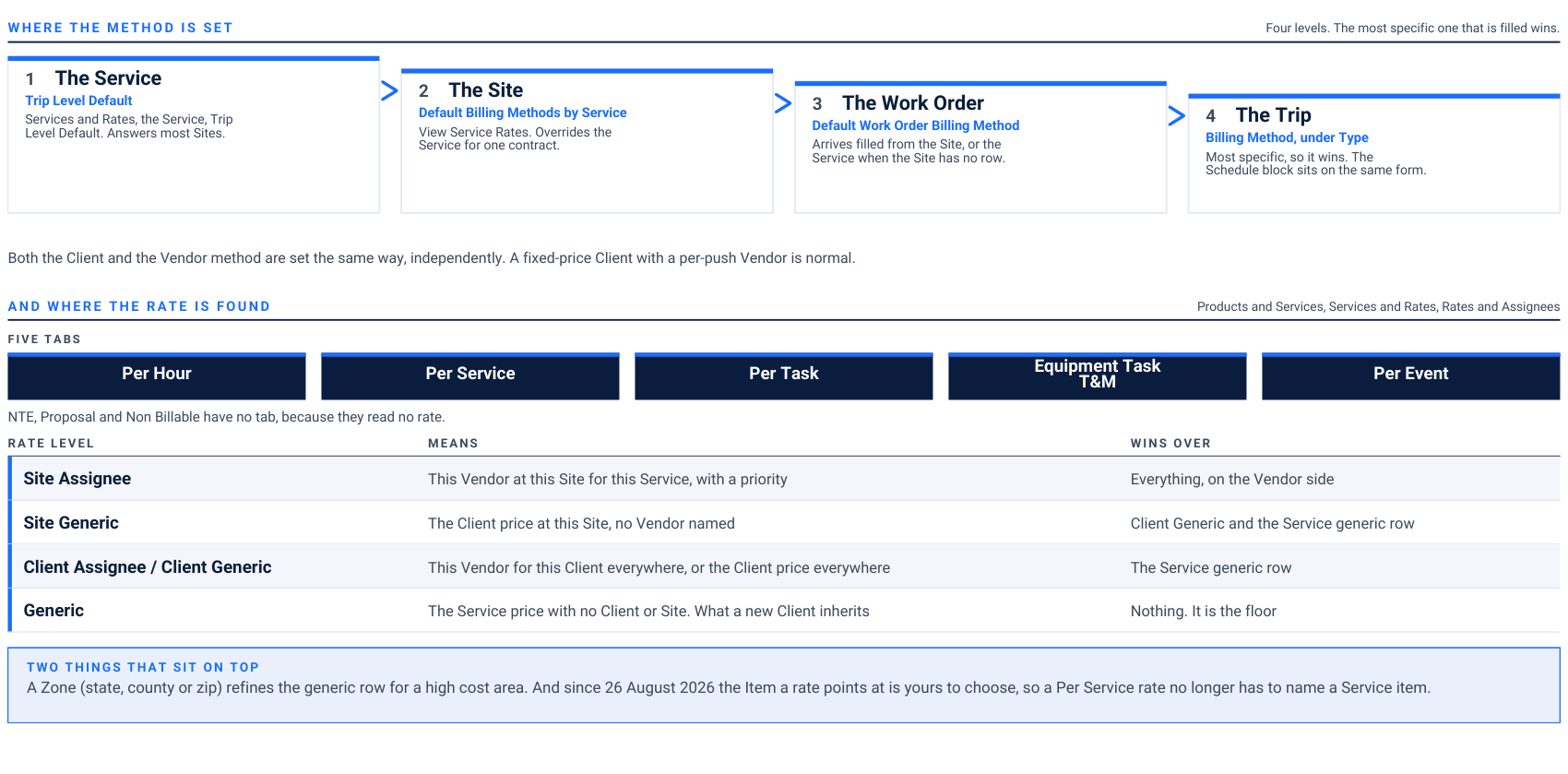
Where the method is set Four levels. The most specific one that is filled wins.
1. The Service Trip Level Default Services and Rates, the Service, Trip Level Default. Answers most Sites.
2. The Site Default Billing Methods by Service View Service Rates. Overrides the Service for one contract.
3. The Work Order Default Work Order Billing Method Arrives filled from the Site, or the Service when the Site has no row.
4. The Trip Billing Method, under Type Most specific, so it wins. The Schedule block sits on the same form. Both the Client and the Vendor method are set the same way, independently. A fixed-price Client with a per-push Vendor is normal. And where the rate is found Products and Services, Services and Rates, Rates and Assignees Five tabs
Per Hour Per Service Per Task Equipment Task T&M Per Event NTE, Proposal and Non Billable have no tab, because they read no rate. Rate level Means Wins over
Site Assignee This Vendor at this Site for this Service, with a priority Everything, on the Vendor side
Site Generic The Client price at this Site, no Vendor named Client Generic and the Service generic row
Client Assignee / Client Generic This Vendor for this Client everywhere, or the Client price everywhere The Service generic row
Generic The Service price with no Client or Site. What a new Client inherits Nothing. It is the floor Two things that sit on top A Zone (state, county or zip) refines the generic row for a high cost area. And since 26 August 2026 the Item a rate points at is yours to choose, so a Per Service rate no longer has to name a Service item.
The half loaded sheet. The single most common setup fault is a Site loaded with Assignee rows only. It works until the Vendor backs out, and then Proposals and invoices come up blank with nothing to fall back to. Load the Site Generic row for every Service sold, even at $0.00. The download is the rollback. Export the filtered rows before any bulk upload.
The five tabs, and the rate level column.
Rates and Assignees. One tab per method that reads a rate. The Rate Level column on every row is the ladder from page 3.
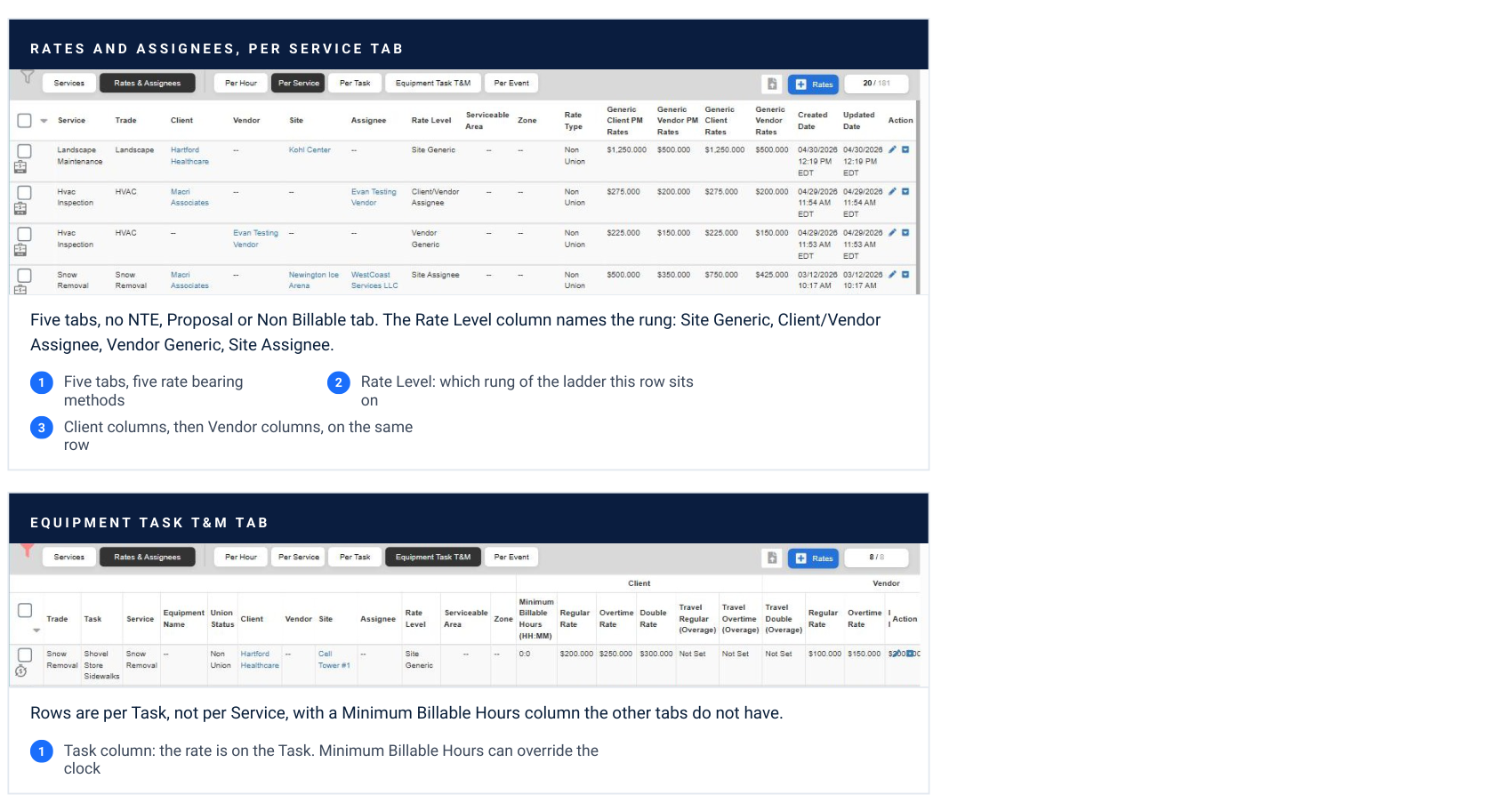
Rates and assignees, per service tab Five tabs, no NTE, Proposal or Non Billable tab. The Rate Level column names the rung: Site Generic, Client/Vendor Assignee, Vendor Generic, Site Assignee. Five tabs, five rate bearing methods Rate Level: which rung of the ladder this row sits Client columns, then Vendor columns, on the same row Equipment task T&M tab Rows are per Task, not per Service, with a Minimum Billable Hours column the other tabs do not have. Task column: the rate is on the Task. Minimum Billable Hours can override the clock
What the screen proves. Every rate bearing method has a tab, and only those five do. If you are looking for where to load an NTE or Proposal rate, stop, there is no such screen. Captured on evanstestcompany.
Your contract says it one way. The platform says it another.
Most billing errors start as a vocabulary error in the contract review, not as a mistake in the system.
| Your contract says | UtilizeCore calls it | Notes |
|---|---|---|
| Per push, each time we plow | Per Task | Each push is a Task line at the Task rate. Per Service is not per push; a Per Service Trip with three pushes bills once. |
| Per visit, per trip, one flat amount each time | Per Service | One line for the Service per Trip, whatever was done. |
| Snow range dependent, a table by inches | Per Event | Needs a synced Site, and ranges with no gaps that run past the biggest storm. |
| A set price each time the service is done | Per Service | Not Per Event. Getting this wrong can block a whole billing season. |
| Per inch | Per Event, one inch ranges | There is no per inch method. |
| Per application, per lot, salt app, a menu of activities | Per Task | Every Task the Service Provider may tick needs a rate on the Site. |
| Hourly, time and materials, T&M, reg / OT / double | Per Hour (T&M) | Minimum billable hours, travel and a truck charge are set on the rate row or as a material line. |
| Billed by time on each task, equipment clocked separately | Equipment Task Time and Material | One labor line per Task, not one for the visit. Load a trade service rate or you get no lines at all. |
| Not to exceed, cap, up to | NTE | Client NTE on the Work Order. Vendor NTE on each Trip, typed at dispatch. |
| Quote, estimate, approved proposal, bid | Proposal | The Client NTE updates from the approved Proposal on accounts where that setting is on. |
| Seasonal, fixed monthly, flat for the season | Scheduled Service agreement, Trips Non Billable | Not a method. The agreement invoices, the Trips prove. |
| Included, warranty, courtesy, no charge | Non Billable | The Vendor side can still be billable. |
| PO required, we cut a PO before the work | Any method, plus a Purchase Order on the Trip | A Purchase Order is cost control, not a billing method, whatever the dropdown implies. |
The two that cost the most. Per push is Per Task, never Per Service. A Per Service Trip with three pushes bills once. And a set price each time the service is done is Per Service, not Per Event; loading it as Per Event can block a whole billing season. Read the contract with this table open before anything is configured.
Eight faults behind most billing errors.
Each one shows up at invoicing, days after the setup that caused it. Work backwards from the column that is wrong.
| What you see | What happened | The fix |
|---|---|---|
| 01. Proposals and invoices come up blank on a Site. | Every rate was loaded as a Vendor assignee row and that Vendor backed out. No Site Generic or Client row existed. | Load the Client price on the Site Generic row for every Service sold. Export, sort by assignee, fill, re-upload. |
| 02. A monthly Client rate hit every completed Work Order. | Generate Client Invoice was set to On Work Order Completion on a fixed monthly Client. | Bill from the Scheduled Service agreement. Trips Non Billable on the Client side, Vendor per Trip. |
| 03. An Equipment Task T&M Trip produced no invoice lines at all. | No trade service rate existed. Per Hour would have given blank lines; this method gives none. | Load the Equipment Task T&M rate before the first Trip, and check one Payable end to end. |
| 04. Only one state's rates show for a Site in another state. | The rate resolved to the Client headquarters state instead of the Site state. | Label rates by state, for example Alarm - CA, and tell your Customer Success team which Site it happened on. |
| 05. The rate dropdown is unusable. | A labor item per rate type with no descriptive label, or a renamed Trade leaving the old name behind. | Name items so they read in a list. Reset and reload from a clean sheet rather than fixing rows one at a time. |
| 06. The Vendor exceeded the NTE and nobody caught it. | Markup reset to zero after editing a line, or the NTE was never typed at dispatch. | Type the Vendor NTE on every Trip. Check the total after editing lines, not before. |
| 07. A quantity based flat price was loaded as hourly. | Per Service was misread as needing Per Hour. | Per Service gives the price. Edit the quantity on the invoice. |
| 08. Vendors can see the target rates. | Vendor rates on a Site are visible in the Vendor Portal. | Move Vendor rates to the state or generic level, or accept the visibility. Confirm the toggle with your Csm. |
What they have in common. Seven of the eight are rate faults wearing a billing method costume. The method is usually right. The rate row it needed was missing, at the wrong level, or named so badly nobody could pick it. One test Trip per Site type catches all eight before a client ever sees them.
NTE is a ceiling. It caps a price, it does not set one.
There are two, and they belong to different people. One caps what the Client will pay. The other caps what you will let the Vendor bill.
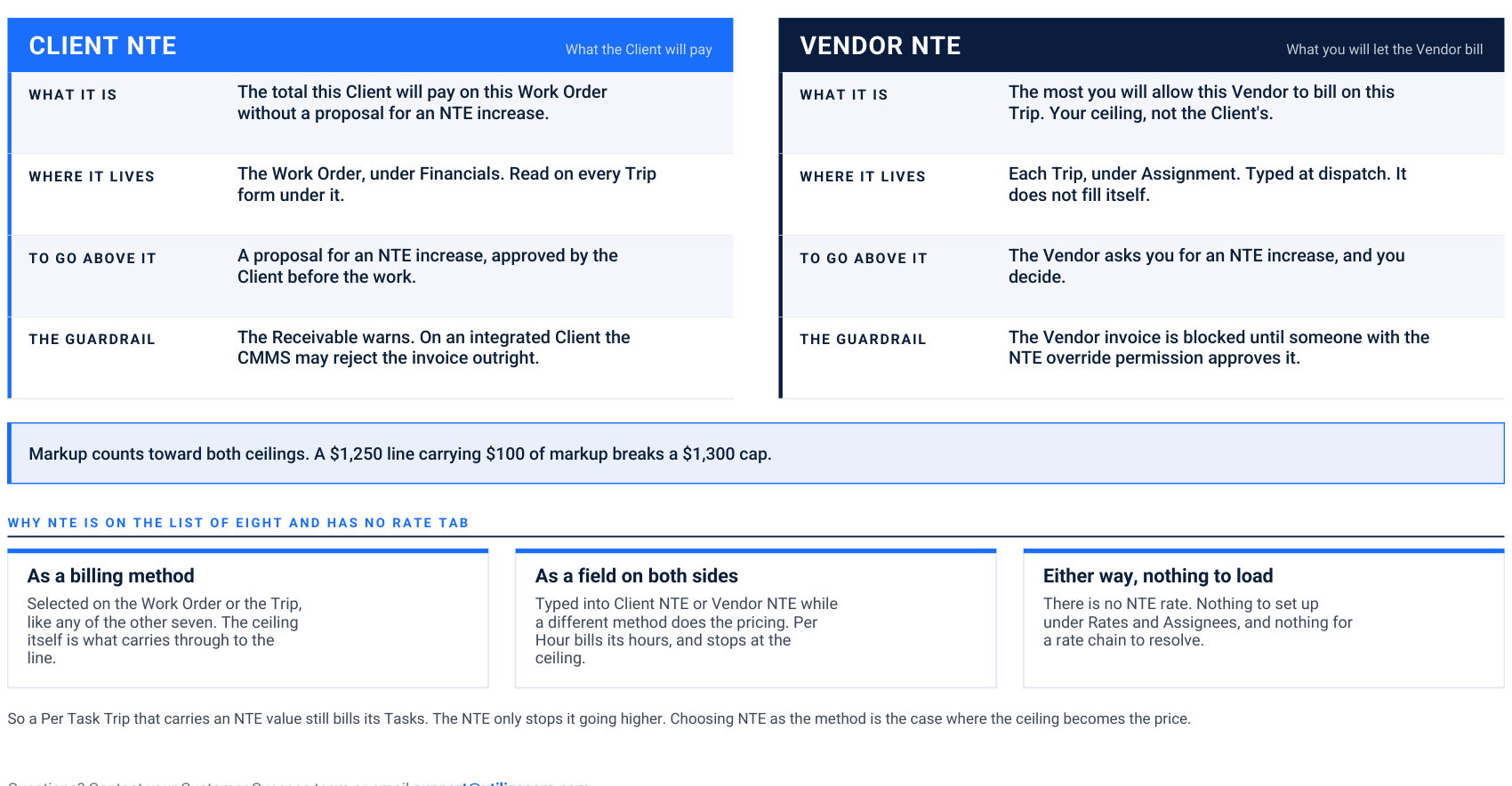
CLIENT NTE What the Client will pay What it is The total this Client will pay on this Work Order without a proposal for an NTE increase. Where it lives The Work Order, under Financials. Read on every Trip form under it. To go above it A proposal for an NTE increase, approved by the Client before the work. The guardrail The Receivable warns. On an integrated Client the CMMS may reject the invoice outright.
VENDOR NTE What you will let the Vendor bill What it is The most you will allow this Vendor to bill on this Trip. Your ceiling, not the Client's. Where it lives Each Trip, under Assignment. Typed at dispatch. It does not fill itself. To go above it The Vendor asks you for an NTE increase, and you decide. The guardrail The Vendor invoice is blocked until someone with the NTE override permission approves it. Markup counts toward both ceilings. A $1,250 line carrying $100 of markup breaks a $1,300 cap. Why NTE is on the list of eight and has no rate tab
As a billing method Selected on the Work Order or the Trip, like any of the other seven. The ceiling itself is what carries through to the line.
As a field on both sides Typed into Client NTE or Vendor NTE while a different method does the pricing. Per Hour bills its hours, and stops at the ceiling.
Either way, nothing to load There is no NTE rate. Nothing to set up under Rates and Assignees, and nothing for a rate chain to resolve. So a Per Task Trip that carries an NTE value still bills its Tasks. The NTE only stops it going higher. Choosing NTE as the method is the case where the ceiling becomes the price.
Where the Client NTE lives.
The Financials block on a Work Order. The default billing method and the Client ceiling sit together, above the invoice generation defaults.
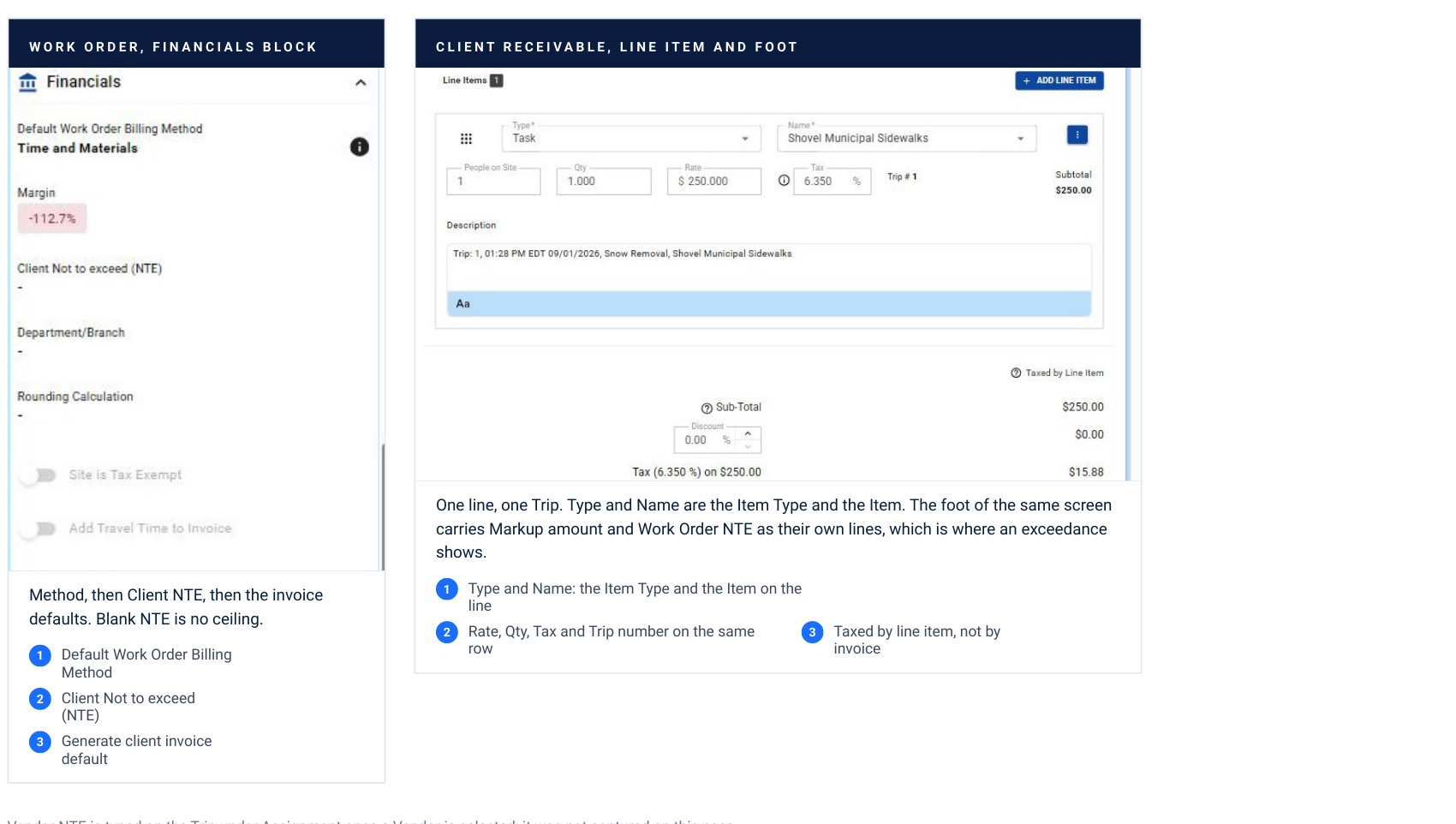
Work order, financials block Method, then Client NTE, then the invoice defaults. Blank NTE is no ceiling. Default Work Order Billing Method Client Not to exceed (NTE) Generate client invoice default Client receivable, line item and foot One line, one Trip. Type and Name are the Item Type and the Item. The foot of the same screen carries Markup amount and Work Order NTE as their own lines, which is where an exceedance shows. Type and Name: the Item Type and the Item on the line Rate, Qty, Tax and Trip number on the same row Taxed by line item, not by invoice Vendor NTE is typed on the Trip under Assignment once a Vendor is selected; it was not captured on this pass.
The field is small. the consequence is not.. A blank Client NTE is not a zero ceiling, it is no ceiling. On an integrated Client the CMMS can reject the invoice outright when the ceiling is crossed, days after the work. Captured on evanstestcompany, Work Order 6494206, Receivable 0247.
Questions? Contact your Customer Success team or email support@utilizecore.com.