
Overview
When you finish a Trip, or can't, there are three ways to end it. This article shows when to use each so your work is recorded.
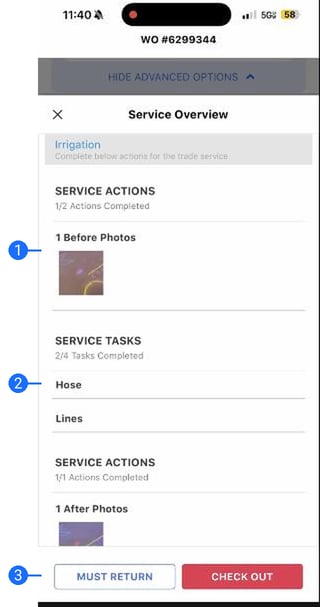
The Service Overview
- Photo review. Your before and after photos, for a last look before you check out.
- Task review. Every completed task, together, so you can confirm the Trip is done.
- Finish the Trip. Must Return on the left, Check Out on the right.
Once you check out, the Trip is done and everything you captured syncs to the office.
The three pathways
- Check Out. The Trip is finished. Confirm the overview, capture a signature if required, and check out. From the Service Overview.
- Must Return. The Work Order is not finished (parts, weather, a callback). A return Trip is scheduled and the record shows why. From the Service Overview.
- Pause Trip. You are stepping away, not leaving (lunch, moving equipment). Your timer and place are held. From your Trip screen.
Syncing and offline work
- Data syncs automatically. The app works offline. Back in signal, it uploads on its own and the cloud icon shows it working. If a Trip still shows Sync Data, tap it to push it through.
- Always check out. If you check in but never check out, the Trip is not finished. Reopen it and check out so your work is recorded.
Related articles
- Complete Required Photos, Tasks, and Inspections on a Trip
- Send Work Order Notes and Create Proposals from Your Phone
Need help?
Reach out to your Technical Account Manager or contact support@utilizecore.com.