
Hello! We've had a busy month packed with powerful updates across the platform, focusing on better integrations, financial transparency, and enhanced usability to make your day-to-day workflows smoother.
🌟 New Features
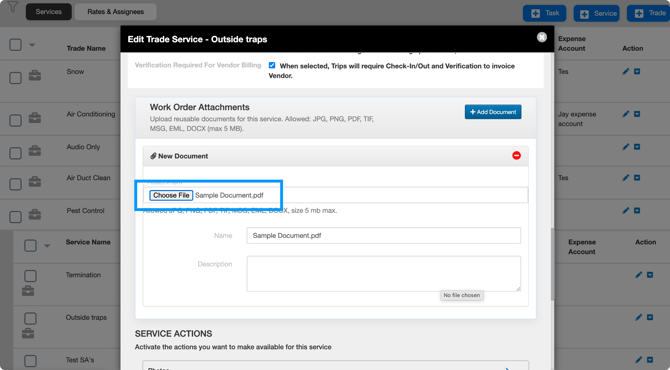
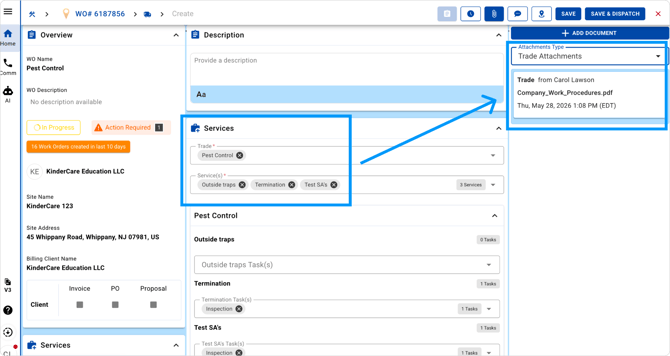
- Service Attachments for Dispatch: You can now attach documents to a Service, ensuring they are automatically included in dispatch emails and available on related Work Order attachment views.
Instructions:
- Go to Service Module and Edit or Create a Service
- In attachment section, upload attachment(s):
- Create a Work Order and Trip with the Service/Trade and see the attachment automatically included “Trade Attachments” once the Trip is dispatched.
- Asset Association with Scheduled Service Agreements: Now assets can be associated to scheduled service agreements on agreement Creation and Edit. This will automatically associate the assets to the Work Order when it is generated.
- Geographically-based Rates: Billing rates can now be associated with multiple county, state, and ZIP codes. This will allow you to set prices for Clients and Vendors based on the Service and Location.
- Customize Trip Dispatch Emails: Customize the message and who receives the email when dispatching a Trip.
- Recurring Trips Available for Scheduled Service Agreement Work Orders: Scheduled Service Agreements can be configured to generate recurring daily/weekly/monthly Trips on a single Scheduled Service Work Order.
- Resend Client Portal Invite: From the Clients List, you can now resend invitations to the Client Portal. The invite will be sent to the primary email on the Client's profile.
- Improved Margin Calculation for Proposal Billing Methods: When the Trip’s Billing Methods is set to ‘Proposal”, the Work Order’s profitability calculation will now consider all Client and Vendor Proposals in an Approved and/or Evaluate status. Brokers can update the status of any proposal to Evaluate to understand the margin before Approving Proposals.
- Profit Margin Display on Work Orders (Available in V3): Work Order details now show the Profit Margin in the Financial section, with a clickable breakdown pop-up for faster financial review.
- Control Sending of Emails with Proposal Status Updated: When changing the status of a Proposal, you can now choose if you'd like to send an email notification to the Client / Vendor.
🔗 Integration Enhancements
- ServiceChannel PO Connection: Manual PO linking now automatically creates an external CMMS connection when a Client PO is entered on a Work Order. This reduces manual effort and ensures proper association for outbound updates.
- InspectPoint Data Sync: Assets created in InspectPoint and web-based Check-In/Out actions performed via the Adjust feature are now automatically synced to UtilizeCore. To learn more, contact Sales@utilizecore.com.
- PRISM (Building Engines) Integration: We’ve implemented a UtilizeCore integration with PRISM Work Orders and Inspection Tasks.
- Controlled ServiceChannel Sync: We’ve introduced configurable cut-off date validation to ensure only Work Orders created on or after a defined date are synced from ServiceChannel to UtilizeCore.
- Control Client Name in Memo for QuickBook Online Integration: You can now exclude a ‘Client Name’ from the memo field for your UtilizeCore to QuickBooks Online integration. Contact support@utilizecore.com for more information.
Questions? Contact your Account Manager, or email support@utilizecore.com