
Hello! July was a very productive month for UtilizeCore with more bug fixes and new enhancements to streamline user workflows.
🖇️ Dispatch Email Attachment Control
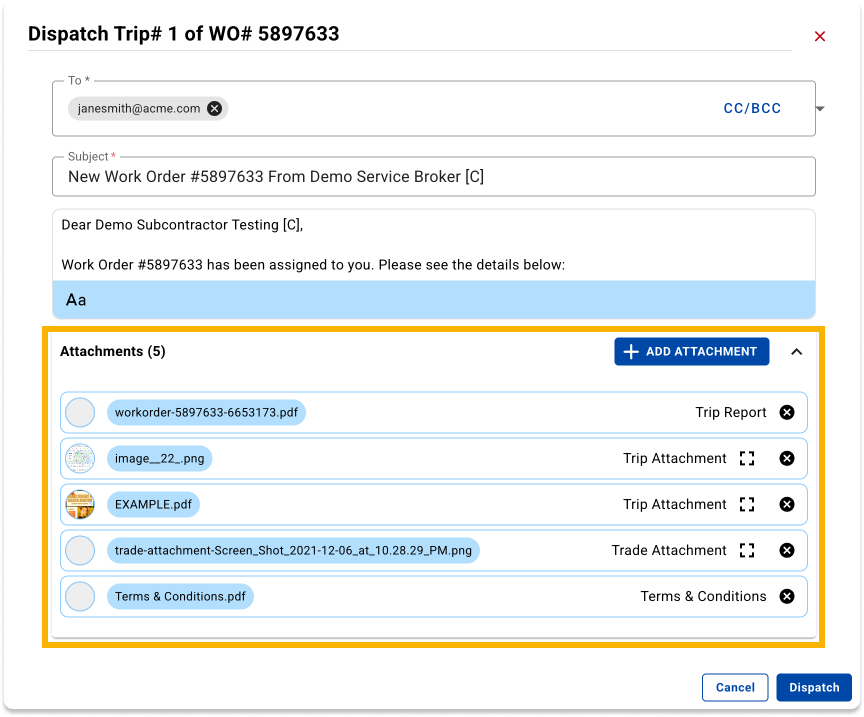
Users can now manage which attachments are included with trip dispatch emails directly in the dispatch pop-up. Attachments from the work order (WO PDF, Trade, Service, Trip) are listed with the ability to remove files before sending. You can also attach additional files from the file browser. All added files are saved as Trip attachments upon dispatch.
🌁 Attachment Preview from Attachment Component
A new in-browser preview capability has been added to the attachment lists. Users can now preview image attachments in fullscreen with download, carousel navigation, and hide/show capabilities—without needing to download files repeatedly. Currently available across Work Order attachments, Trip attachments, Invoices (AR/AP), Proposals, Locations, Assets, Notes, and Edit Visit.
⚙️ Custom Columns for All Version 3 Lists
Role-based custom column configuration is now available across all V3 list views, including Sites, Clients, Vendors, Employees, Roles, Proposals, Purchase Orders, Invoices, Payments, Assets, Regions, Crews, and Visits. Users can reorder columns, and preferences are saved for each user.
🖥️ Full Screen / Split Screen Toggle for Detail Views
Users can now toggle between split-screen and full-screen modes on any resource detail panel. The platform saves the user's last view preference and the resizable detail panel size also persists across sessions and page refresh.
👤 Vendor/Employee/Region Profile Links from Work Order List
Assignee names (Vendor, Employee, Region Team Member) in Work Order and Trip lists are now clickable links that open the profile in a new tab and the contact popup avatar also links to the profile.
🔁 Manual Recurring Trip Generation from Agreement Relationships
Users can now manually generate recurring trips from the Agreement Relationship page. A "Generate Trip" action button appears next to each scheduled trip event, and a "View Trip" button navigates directly to created trips.
📈 Email File Attachment Support for Finance Modules
We’ve expanded accepted file types to include .msg and .eml across all financial attachment areas—Invoices (AP/AR), Proposals, WO Documents, Location attachments, and Asset attachments.
Questions?
Contact your Account Manager, or email support@utilizecore.com